Run a speed test on your booking page today, then fix whatever is slowest before touching anything else. Aim for a Largest Contentful Paint under 2.5 seconds and an Interaction to Next Paint under 200 milliseconds, tested on mobile. Every additional second of load time is costing you appointments, and for most salons, the booking page is where the damage happens first.
TL;DR:
- Improving load times on the booking page can directly increase mobile appointment conversions, with a three-second delay potentially costing 10 to 20 percent of bookings.
- Prioritizing the booking page, homepage, and ad landing pages for speed optimization ensures the most profitable parts of your site load quickly on mobile devices.
- Fixes such as compressing images, moving booking widgets to dedicated pages, enabling caching, and removing unnecessary plugins can significantly boost speed with minimal effort.
- Slow interactivity issues often stem from JavaScript blocking, which can be addressed by splitting tasks, deferring scripts, and optimizing critical CSS and fonts.
- Regularly testing with multiple tools and tracking key metrics like Largest Contentful Paint and Interaction to Next Paint helps measure improvement and justify ongoing speed investments.
Table of Contents
- How Fast Should Your Salon Site Load?
- Why Does Salon Website Speed Actually Matter?
- Step-by-Step Salon Page Speed Optimization
- How Do You Audit and Measure Salon Site Speed?
- Quick Wins Salon Owners Can Do Today
- What Technical Fixes Improve INP and Server Speed?
- How Do You Measure the ROI of Speed Improvements?
- What Does a Salon Speed Fix Actually Look Like?
- An Editorial Take on Salon Speed Fixes
- Get Your Salon’s Speed and Booking Funnel Fixed
- Sources
- FAQ
How Fast Should Your Salon Site Load?
Google’s Core Web Vitals give you three numbers to chase: Largest Contentful Paint (LCP) under 2.5 seconds, Interaction to Next Paint (INP) under 200 milliseconds, and Cumulative Layout Shift (CLS) under 0.1. These get measured at the 75th percentile, meaning three out of four visits to your site need to hit these marks, not just your best-case test on office Wi-Fi.
Score-wise, treat 80 or higher on mobile PageSpeed Insights and 90+ on desktop as reasonable working targets, though the Core Web Vitals pass/fail matters more than the raw score.
Prioritize testing in this order:
- Your booking or scheduling page first, since that’s where money changes hands
- Your homepage second, because it’s usually the entry point from Google search
- Any dedicated ad landing pages third, since paid traffic is the most expensive to waste
Mobile comes before desktop every time. Most salon booking traffic arrives on a phone, often from someone searching while standing in line or scrolling Instagram between appointments.
Why Does Salon Website Speed Actually Matter?
Speed isn’t a technical vanity metric. It’s a direct line to boost SEO and conversions with faster website speed.
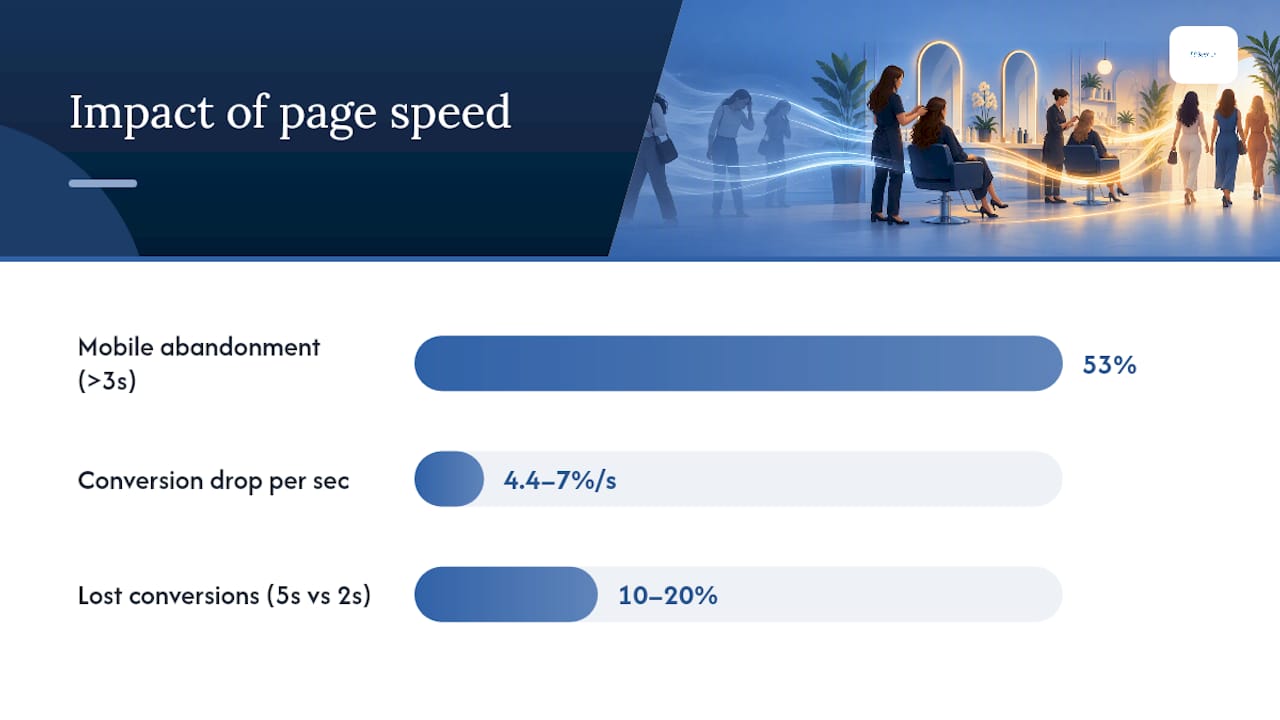
According to Google’s own research, roughly 53% of mobile visitors abandon a page that takes longer than 3 seconds to load, with conversion rates dropping 4.4% to 7% for every additional second of delay.
Statistic Callout: A booking page that loads in 5 seconds instead of 2 could be losing 10 to 20% of the conversions a faster version would capture, purely from load-time abandonment.
Run the math on your own numbers. If your site gets 400 mobile visits a month to your booking flow and converts 8% of them, a 3 second delay could mean the difference between 32 booked appointments and 26. At an average service value of even $60, that’s several hundred dollars walking away every month, before you factor in the ad spend you burned sending that traffic there in the first place.
Slow pages also hurt you twice with paid ads:
- Google Ads quality scores factor in landing page experience, so slow pages can raise your cost per click
- A slow page after a click means you paid for a visitor who never saw your services or prices
If you run Google Ads for your salon, a slow landing page is quietly taxing every campaign you run.
Step-by-Step Salon Page Speed Optimization
Fix things in this order. Doing them out of sequence wastes time and sometimes money, since some fixes only matter once earlier bottlenecks are cleared.
-
Run a baseline audit. Test your homepage, booking page, and any ad landing pages before changing anything. Owner or developer, low complexity, high impact. You can’t measure improvement without a starting point.
-
Check your hosting and server response time. Shared hosting plans built for low traffic often can’t handle image-heavy salon sites with embedded booking widgets. Developer task, medium complexity, high impact. If your server takes over 600 milliseconds to respond before any content loads, no amount of front-end tweaking will fully fix it.
-
Turn on caching and add a CDN. A content delivery network serves your images and scripts from a server geographically close to the visitor. Developer or plugin-based, low to medium complexity, high impact. Most modern hosts include this, and many salon website platforms have it built in already.
-
Fix your images. Compress every photo, serve responsive sizes for mobile versus desktop, and convert to modern formats. Owner-doable with the right tool, or developer for bulk automation, low complexity, high impact. Salon sites are usually photo-heavy, which makes this one of the highest-leverage fixes available.
-
Isolate or replace your booking iframe. Embedded booking widgets are frequently the single biggest speed drag on a salon site, because they load an entire third-party application inside your page. Moving the booking tool to its own dedicated page, separate from your homepage, often produces the largest single performance gain you’ll see in this whole process. Developer task, medium complexity, very high impact.
-
Audit third-party scripts. Review widgets, chat plugins, social feed embeds, and analytics trackers all add weight and can block the page from becoming interactive. Developer task, medium complexity, high impact. Keep only what earns its keep.
-
Clean up your theme and plugins. Unused plugins, bloated page builders, and outdated themes accumulate code that never gets used but still loads. Developer task, medium complexity, medium to high impact.
-
Optimize fonts, CSS, and JavaScript. Limit font weights, inline critical CSS, and defer anything non-essential. Developer task, high complexity, medium impact.
-
Add lazy loading for below-the-fold images. Photos further down the page load only as the visitor scrolls to them. Developer or plugin-based, low complexity, medium impact.
-
Re-test and verify. Run the same test suite against the same pages and compare against your baseline numbers.
Pro Tip: Schedule a recurring quarterly database cleanup for your site. Accumulated plugin data and old revisions build up quietly after launch and slow server response over time, even when nothing on the front end has changed.
How Do You Audit and Measure Salon Site Speed?
Use more than one tool, because each measures something slightly different. PageSpeed Insights combines lab data from Lighthouse with real-world field data from actual Chrome users. Lighthouse alone gives you a controlled lab snapshot, useful for debugging but not a substitute for real visitor data. WebPageTest offers a deeper waterfall view of exactly what’s loading and when, and Chrome DevTools lets you throttle your connection to simulate mobile conditions realistically.
Field data matters more than lab data for reporting, since it reflects your actual 75th percentile visitor rather than a single test run under ideal conditions, as outlined in this Core Web Vitals measurement guide.
| Tool | Data type | Best use |
|---|---|---|
| PageSpeed Insights | Lab + field | Quick overall check, includes real-user data |
| Lighthouse | Lab only | Debugging specific issues in detail |
| WebPageTest | Lab only | Waterfall analysis of load order |
| Chrome DevTools | Lab only | Simulating mobile throttling live |
Test the homepage, the booking page, and any ad landing pages separately, and log LCP, INP, and CLS for each before you start making changes.
Quick Wins Salon Owners Can Do Today
You don’t need a developer for everything. Several fixes take under an hour and move the needle immediately.
- Compress every image on your homepage and service pages using a free tool before uploading
- Replace an autoplay hero video on mobile with a single compressed image; video backgrounds are one of the heaviest things a salon site can load on a phone
- Move your booking widget off the homepage and onto its own booking page
- Turn on caching if your host or platform offers a one-click setting
- Delete plugins and homepage widgets you installed once and forgot about
- Set a page weight budget of roughly 1 to 1.5 MB for your homepage and booking page, and check new images or widgets against it before adding them
Pro Tip: If your hero video is a big part of your brand storytelling, keep it for desktop visitors and serve a static image on mobile instead. You lose nothing on desktop and gain real load-time savings for the majority of your traffic.
Once you’ve done these, if the numbers still aren’t moving, that’s your signal to bring in a developer for the deeper structural fixes.
What Technical Fixes Improve INP and Server Speed?
Slow interactivity usually traces back to JavaScript blocking the main thread. Long Animation Frame (LoAF) data helps developers pinpoint exactly which script or event listener is causing the delay, rather than guessing.
Once identified, developers typically need to:
- Split long JavaScript tasks into smaller chunks so the browser can respond to taps and clicks in between
- Defer or load asynchronously any script that isn’t needed for the first paint, including chat widgets and marketing trackers
- Extract and inline critical CSS so the page renders visible content before loading the full stylesheet
- Switch fonts to a leaner strategy, limiting weights and using
font-display: swap - Convert images to WebP or AVIF, which compress significantly better than JPEG or PNG at equivalent quality
- Upgrade to HTTP/2 or HTTP/3 hosting and set proper caching headers so repeat visits load faster
- Clean up the database regularly, since accumulated revisions and orphaned data slow server response over time
How Do You Measure the ROI of Speed Improvements?
Calculate your relative mobile conversion rate, or Rel mCvR, by comparing your mobile conversion rate to your desktop conversion rate before and after speed work. This method turns a technical metric into a revenue number stakeholders and salon owners actually care about.
Track these side by side, before and after:
- Mobile booking conversion rate
- LCP, INP, and CLS scores
- Bounce rate on the booking page
- Total page weight
Statistic Callout: If mobile conversion rate rises from 6% to 7.5% after a speed fix while desktop stays flat, that gap is a reasonable, defensible estimate of the revenue speed work alone recovered.
Report monthly at first, then quarterly once things stabilize, and always present the conservative estimate rather than the best-case number.
What Does a Salon Speed Fix Actually Look Like?
A typical case follows a familiar pattern: a salon’s booking page is buried behind a heavy embedded widget and an autoplay video, mobile visitors bounce before the calendar even loads, and ad spend is quietly wasted on clicks that never convert. Fixing the image weight, isolating the booking flow, and cleaning up scripts usually recovers a meaningful share of that lost traffic within weeks, not months.
This kind of work overlaps with salon location page SEO and Google Ads landing page health, since speed, structure, and ad performance are rarely separate problems.
An Editorial Take on Salon Speed Fixes
Most salon owners treat page speed like a chore they’ll get to eventually, right after the next slow season passes. That’s backwards. Speed isn’t maintenance, it’s the difference between an ad dollar that converts and one that evaporates the moment someone taps your link and waits. The salons that win aren’t the ones with the fanciest websites. They’re the ones where the booking calendar loads before the visitor loses patience and closes the tab. Run one audit this week on your booking page alone. You’ll likely find one obvious culprit, probably that embedded widget or an oversized hero image, and fixing just that one thing will do more for your bookings than a full redesign would.
— Gerard
Get Your Salon’s Speed and Booking Funnel Fixed
Marketing agencies working with salons and beauty clinics often perform audits, image compression, booking page restructuring, and ad landing page cleanup as part of client campaigns, because a fast site that doesn’t convert paid traffic isn’t actually fast where it counts.
If you’re running Google Ads for your salon or investing in local visibility, a slow booking page is quietly undercutting every dollar you spend. Certain marketing teams can audit your site’s speed alongside your ad funnel and flag where visitors are dropping off before they book. Check out the full range of services, including Facebook, Instagram, and LinkedIn management, and request a walkthrough of what a combined speed and ad audit would look like for your salon.
Sources
FAQ
What Counts as a Good Page Speed Score for a Salon Site?
A good target is 80 or higher on mobile PageSpeed Insights and 90+ on desktop, but the more important benchmark is passing Core Web Vitals: LCP under 2.5 seconds, INP under 200 milliseconds, and CLS under 0.1. A high raw score with a failing Core Web Vital still means real visitors are having a slow experience.
How Do I Make My Salon Website Load Faster?
Start with the biggest weight offenders: compress your images, replace any autoplay hero video on mobile with a static image, and move your booking widget off the homepage onto its own page. From there, enable caching, add a CDN, and clean up unused plugins before tackling deeper script and font fixes.
How Important Is Page Speed for SEO and Local Visibility?
Speed is one input among several in Google’s page experience signals, alongside mobile usability, HTTPS, and avoiding intrusive interstitials, so a fast site alone won’t guarantee rankings. It does directly affect conversions though, since mobile visitors abandon slow pages at a documented rate, which means even identical rankings translate into fewer actual bookings.
What Is Page Speed, Exactly?
Page speed measures how quickly a webpage becomes visible and usable to a visitor, tracked through metrics like LCP for loading, INP for interactivity, and CLS for visual stability. For a salon site, it specifically means how fast someone can see your services and complete a booking without waiting or fighting a shifting layout.
Can Growthreachmarketing Audit My Salon’s Site Speed?
Yes, speed and landing page health are part of the broader marketing and ad performance work Growthreachmarketing does for salons and beauty clinics. Current service details and pricing are available on the services page.