Booking page SEO means making your reservation page easy for search engines to crawl and easy for a visitor to book from, with no gap between what Google sees and what a guest sees. The highest-impact fix is simple: make sure your price and availability data render in the actual HTML a crawler reads, not just in a JavaScript widget, and put a clear booking call to action above the fold. Everything else in this guide, from schema to tracking to multi-currency handling, builds on that one fact.
TL;DR:
- Ensuring prices and availability render directly in HTML, not just through JavaScript, is critical for search engine crawlability and ranking.
- Booking pages should prioritize clear, booking-intent keywords in titles, meta descriptions, and CTA labels, with exact price and availability details visible above the fold.
- Verifying that structured data and schema markup reliably expose total stay prices, including fees, significantly impacts rich result eligibility.
- Fast loading, optimized images, and accurate content placement around the booking form improve conversion rates and search signals.
- Maintaining rate and availability parity across your website, Google Business Profile, and metasearch feeds prevents lost traffic and flagging for rate inconsistencies.
Table of Contents
- On-page SEO for booking pages: keywords, meta, copy, and CTAs
- Technical SEO and crawlability for booking widgets, structured data, and price accuracy
- Content, images, and UX that increase booking conversions and search signals
- Local discovery and metasearch: keeping rates and availability consistent across channels
- Tracking and attribution for bookings: GA4 events and verification
- Common mistakes and a fast diagnostics checklist to hand to your developer
- Copy-paste checklist and short case examples from Growth Reach Marketing
- Handling multi-language and multi-currency aspects on booking pages
- How to optimize booking pages for voice search
- Author perspective: priorities for 2026 and where the real returns are
- How Growth Reach Marketing can help with booking page SEO
- FAQ
- Sources
On-page SEO for booking pages: keywords, meta, copy, and CTAs
Your title tag, meta description, and H1 should match what someone types when they already intend to book, not when they’re browsing. “Book [Property Name] Direct, Best Rate Guaranteed” outperforms a generic “Welcome to [Property Name]” because it mirrors booking intent rather than brand intent. Put the destination, property type, and a rate signal (even “from” pricing) in the title, and keep the meta description under 155 characters with a concrete reason to click, such as no booking fees or free cancellation.
Above the fold, a visitor needs three things within one glance: the price, the availability for their dates, and a button that starts the booking flow. Cut throat-clearing copy like “nestled in the heart of” and replace it with specifics: room types, square footage, view, cancellation window. Purchase-intent copy answers “why book here instead of an OTA,” so lead with rate parity or a direct-booking perk if you have one.
Your CTA button should say what happens next (“Check Availability,” “Book Now, Pay Later”) rather than a vague “Learn More.” Keep URL structure flat and readable, something like /book/deluxe-room rather than a string of query parameters and session IDs, since clean URLs are easier to index and easier for you to track. Whatever price and promotion text shows in your Google Ads or metasearch feed must match the booking page word for word. A mismatch between an ad’s advertised rate and the page’s displayed rate is one of the fastest ways to raise bounce rates and get flagged by metasearch partners.
A quick on-page checklist:
- Title tag includes property name, location, and a booking-intent phrase.
- H1 matches the page’s primary purpose, not a generic greeting.
- CTA text describes the action, not a vague instruction.
- URL is short, readable, and free of unnecessary parameters.
- Ad and metasearch copy matches the live page price exactly.
Pro Tip: Write your meta description as if it’s competing against three OTA listings for the same click. It usually is.
Technical SEO and crawlability for booking widgets, structured data, and price accuracy
Most booking widgets load prices and room availability through client-side JavaScript after the initial page load. If a search engine’s crawler doesn’t execute that JavaScript the way a browser does, it sees a page with no price at all, which can suppress both rankings and rich result eligibility. Confirm this by running the page through Search Console’s URL Inspection tool and checking whether the rendered HTML actually contains your rates. If the price is missing from that rendered view, your rates are invisible to Google regardless of how your page looks in a browser.
When client-side rendering hides your prices, server-side rendering (SSR) or dynamic rendering is the fix: the server sends a fully formed HTML page with the price already in place, so no JavaScript execution is required for the crawler to see it.
On the structured data side, Google’s hotel prices documentation recommends verifying price extraction directly and favors markup that reliably exposes total stay price, including applicable fees, rather than a teaser rate that excludes taxes. Microdata can extract more reliably than JSON-LD for price-sensitive fields, which matters most on pages where the price itself is the conversion trigger.
After any rendering or schema change, run these tests in order:
- Search Console URL Inspection to confirm the rendered HTML contains your price.
- Google’s Rich Results Test to confirm the markup validates and pulls the correct fields.
- A manual test booking, placed and then canceled, to confirm the live flow matches what’s indexed.
- A second URL Inspection a few days later to confirm Google’s cached version updated.
Industry guidance notes that fundamentals like crawlable, accurate pricing matter more than chasing AI-visibility shortcuts, according to Triptease’s analysis of Google updates, which ties direct-channel protection directly to whether your price data is genuinely crawlable.
Content, images, and UX that increase booking conversions and search signals
Images on a booking page do two jobs at once: they help a visitor decide, and they contribute to how fast the page loads, which affects both ranking and conversion. Compress images before upload, serve responsive sizes with srcset so a phone doesn’t download a desktop-sized file, and write alt text that describes the actual room or amenity rather than a keyword string.
FAQs, cancellation policies, and trust elements (security badges, guest review counts, a phone number) belong near the booking form itself, not buried on a separate policies page. A crawler indexing the booking page picks up that context too, which helps the page answer more of the searcher’s questions without a second click.
Small wording changes reduce abandonment more reliably than redesigns. Replace “Submit” with “Confirm My Room,” and replace a bare error message with one that tells the visitor exactly what to fix, like a date range that’s unavailable.
A short list of what to test and watch:
- Button copy and color against your current baseline.
- Form field count: fewer fields usually means fewer drop-offs.
- Placement of trust badges relative to the payment step.
- Micro-conversions like “dates selected” or “room viewed” as early signals before the full booking completes.
Pro Tip: Track the step where visitors abandon most often. A single confusing field can cost more bookings than a weak headline.
Local discovery and metasearch: keeping rates and availability consistent across channels
Your Google Business Profile, your website’s structured data, and your metasearch feeds (Google Hotel Ads, TripAdvisor, Trivago) all need to agree on the same number. When they don’t, you either lose the click to an OTA showing a lower rate or you get flagged for rate inconsistency.
A short consistency checklist:
- Confirm your Google Business Profile’s booking link and pricing attributes match the live booking page.
- Confirm your metasearch feed’s rate matches what a visitor sees after clicking through, not a stale cached rate.
- Check parity weekly during high-demand periods when OTAs adjust rates faster than feeds update.
- Re-run a test search on Google Hotel Ads to confirm your listed price matches your direct page.
Metasearch platforms crawl or ingest a feed separately from your website, so a change made only on your site doesn’t automatically propagate. Direct-channel revenue depends on that parity holding, since a visitor who sees a cheaper OTA rate on a metasearch result will rarely bother checking your site first.
Tracking and attribution for bookings: GA4 events and verification
You need to track a visitor who starts a booking, one who completes it, and the room or rate selected, without counting the same booking twice across devices or sessions. Set up these events in order:
- A
begin_checkout-style event when the booking form opens. - A completed
purchaseevent tied to a unique booking confirmation ID, so a page refresh doesn’t double-fire it. - A reconciliation check against your property management system or booking engine’s own report, weekly at minimum.
When client-side tracking is unreliable, often because of ad blockers or slow widget loads, server-side tagging or GA4’s Measurement Protocol sends the event directly from your server instead of relying on the browser. Our GA4 booking events guide walks through the exact setup for the purchase event and confirmation ID matching.
Pro Tip: Run one test booking a month and check it shows up in GA4 within 24 hours. If it doesn’t, something broke quietly.
Common mistakes and a fast diagnostics checklist to hand to your developer
Five mistakes account for most lost direct bookings:
- Prices rendered only in JavaScript, invisible to crawlers.
- Slow-loading booking widgets that push back the CTA.
- Ad or metasearch copy that doesn’t match the live page price.
- Missing or invalid structured data for price and availability.
- A CTA buried below the fold or past a scroll.
Five tests to run immediately:
- URL Inspection to confirm rendered price.
- Rich Results Test on your schema.
- A mobile Lighthouse speed check.
- A manual test booking end to end.
- An image weight audit on the booking page.
Fix hidden prices and slow rendering first, using a specialized Shopify Speed Optimization Service when applicable. Those two block both ranking and conversion at once, so they outrank everything else on the list.
Copy-paste checklist and short case examples from Growth Reach Marketing
One hospitality client’s booking page returned a blank price field in URL Inspection; after switching to server-rendered pricing, the rate appeared in the indexed HTML within days. A second client’s metasearch feed was six hours behind their live rate during a promotion, which we caught by running a manual parity check against the feed.
A drop-in checklist you can hand to a developer:
- Run URL Inspection on the booking page and confirm price appears in the rendered HTML tab.
- Validate Hotel, Offer, and PriceSpecification schema with the Rich Results Test.
- Confirm GA4 fires a
purchaseevent with a unique confirmation ID on test bookings. - Compress booking page images and serve responsive sizes.
Pro Tip: Keep a one-page “last tested” log for these checks. Booking widgets update silently and break silently too.
For schema snippets adapted from a similar high-intent booking context, our clinic schema markup guide shows the JSON-LD structure and the exact tests to run after publishing.
Handling multi-language and multi-currency aspects on booking pages
A booking page in multiple languages needs separate URLs per language (like /en/book/ and /fr/book/) with hreflang tags connecting them, so search engines show the right version to the right searcher instead of guessing. Avoid auto-translating only the visible text while leaving meta titles, alt text, and structured data in the original language, since that mismatch confuses both crawlers and bilingual visitors.
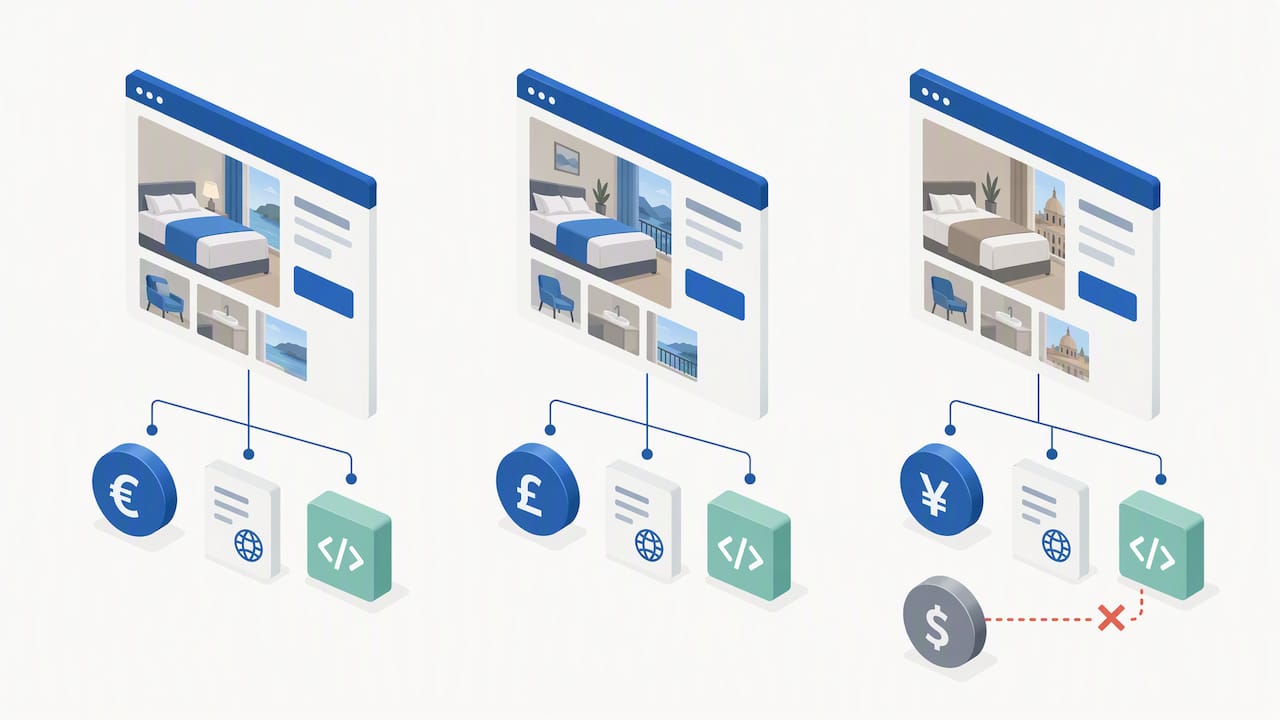
For currency, display the price in the visitor’s likely local currency where you can detect it, but always confirm the currency clearly next to the number rather than relying on a symbol alone, since $ and other symbols are shared across multiple currencies. If your booking engine charges in a single currency regardless of display, state that plainly near the price so a visitor isn’t surprised at checkout.
Structured data should reflect the actual currency and language of each page version rather than a single default copied across all versions. A French-language page showing USD in its schema while displaying EUR on screen creates exactly the kind of mismatch that erodes trust and can cause a rich result to show the wrong figure.
Keep policy text (cancellation windows, fees, taxes) translated in full, not just summarized, since a shortened translation can accidentally omit a condition that matters legally in that visitor’s market.
How to optimize booking pages for voice search
Voice queries tend to be longer and more conversational than typed ones, things like “find me a hotel room near the airport for tonight” rather than “airport hotel.” Booking pages that answer this kind of phrasing directly, in short sentences near the top of the page, have a better chance of being the source a voice assistant reads aloud.
Structured FAQ content helps here too: a question-and-answer pair phrased the way someone would actually ask it (“Is breakfast included?”) gives a voice assistant a clean, quotable answer instead of a sentence buried in a paragraph. Keep these answers short, factual, and placed near the content they describe rather than isolated on a separate page.
Local intent matters heavily in voice search, since many voice queries include “near me” or a specific area. Confirm your Google Business Profile details and your page’s address and contact structured data match exactly, because a voice assistant often pulls from that listing data rather than crawling your page directly.
Author perspective: priorities for 2026 and where the real returns are
The fundamentals haven’t changed, they’ve just gotten more visible. Crawlable, accurate pricing was always the baseline; it’s now also the baseline for whether an AI overview can cite you at all. Our practical playbook for AI overview optimization covers how short, citable capsules change snippet design, but that only matters once the price itself is actually readable by a machine.
For the next six to twelve months, I’d prioritize three things: fix rendering before touching schema, reconcile your tracking before trusting your reporting, and keep every channel showing the same number.
— Gerard
How Growth Reach Marketing can help with booking page SEO
We work with salons, aesthetic clinics, and beauty brands on the exact technical and content problems covered here: fixing rendering gaps, setting up GA4 booking events correctly, implementing structured data, and writing content built around booking intent rather than generic brand copy.
If you want a short audit of where your booking page is losing visibility or visitors, that’s a conversation worth having before you spend on ads pointing at a page with hidden prices. Services we offer include:
- Technical SEO fixes for crawlability and rendering issues.
- GA4 booking event setup and verification.
- Schema implementation and testing.
- Content built around booking and appointment intent.
Start with our services page to see what fits, or review our AI search visibility audit framework if you want to check readiness yourself first.
FAQ
Is SEO still worth it in 2026?
Yes, SEO remains worth the investment because industry analysis of recent Google updates ties direct-channel revenue directly to whether a site’s pricing and availability data is crawlable and accurate. AI-driven search features build on the same fundamentals rather than replacing them, so sites with clean, accurate data tend to benefit in both traditional and AI-generated results.
What is the 80/20 rule in SEO?
The rule in SEO generally refers to focusing most of your effort on the small set of fixes that drive most of the results, such as crawlability, accurate pricing, and page speed, rather than spreading effort evenly across every possible tactic. For booking pages specifically, that usually means fixing rendering and schema issues before fine-tuning secondary content.
What does SEO page mean?
An SEO page is a page built or optimized to rank for a specific search intent, with its title, headers, content, and technical structure aligned to what a searcher is trying to accomplish. A booking page qualifies when its title, meta description, and content are built around booking intent rather than general brand information.
How much does on-page SEO cost?
On-page SEO costs vary widely depending on whether it’s done in-house or through an agency, and no single published rate applies across the industry. Growth Reach Marketing’s pricing for related services like social media and ad management is available on request through our services page.
Sources
- Google updates and what they mean for your direct channel — Triptease
- Google support: Hotel prices crawling guidance