Most suspended Google Business Profiles can be reinstated if you audit the profile, gather official evidence, and file a correctly completed appeal through Google’s appeals tool. A gbp suspension fix starts with one rule: don’t create a new listing while the old one is under review. Instead, spend the next hour confirming your business details are accurate, then get your documents ready because the evidence form gives you only a limited time to upload once you open it.
TL;DR:
- Ensuring that your business name, address, and phone number are consistent across all online profiles is crucial before appealing a suspension.
- Filing a successful appeal requires a complete evidence pack, including documents like business registration and utility bills, uploaded within a strict 60-minute window.
- Creating a new listing during an active suspension or appeal process can lead to further violations and jeopardize reinstatement efforts.
- Most suspensions stem from recent edits or address mismatches; reverting or correcting these details can significantly improve the chances of approval.
- Using an agency to prepare and submit your appeal can reduce errors and speed up reinstatement by managing timing and evidence organization professionally.
Table of Contents
- What Kind of GBP Suspension Are You Dealing With?
- The Reinstatement Workflow, Start to Finish
- What Documents Actually Convince Google
- Completing the Appeal Without Losing Your Evidence
- Keeping Your Profile Reinstated
- Why Some Owners Hand This Off to a Specialist
- Get Your Listing Back Faster With Growth Reach Marketing
- Sources
- FAQ
What Kind of GBP Suspension Are You Dealing With?
Before you touch the appeals tool, figure out exactly what Google flagged. The suspension notice, either in your email or inside the Business Profile dashboard under account restrictions, usually names a policy violation type and links to the specific guideline you allegedly broke. Google shows you the violated policy category but doesn’t tell you which edit or field triggered it, so the diagnosis work falls on you.
There are two very different problems hiding under the word “suspension.”
- Account restriction: This blocks your entire Google account, meaning every profile tied to it, not just one listing. You’ll see this in the “My Business” or account-level restrictions page rather than on an individual profile.
- Single profile suspension: Only one listing is affected. Other locations or profiles under the same account keep functioning normally.
If it’s an account-level restriction, resolve that first through the account restrictions workflow before you try to reinstate any individual profile. Filing a profile appeal while the parent account is still restricted wastes your one shot.
You also need to know whether you’re facing a hard suspension or a soft suspension. A hard suspension usually removes the listing entirely from search and maps, and you often cannot edit any fields until the appeal is resolved. A soft suspension may leave some editing access open and sometimes resolves without a full appeal, though you should still audit for the cause.
One more wrinkle worth knowing about: periods of widespread algorithmic sweeps and verification-loop bugs have hit thousands of legitimate businesses with little warning. If your suspension coincided with a known bug wave, appeals can take longer and outcomes get less predictable. That’s not a reason to skip the appeal. It’s a reason to prepare your evidence pack even more carefully, since a clean submission is your best defense against a backlog.
The Reinstatement Workflow, Start to Finish
Treat this like a pre-flight checklist, not a form you fill out on the fly. Google’s appeals process rewards preparation and punishes improvisation, mostly because of that 60-minute upload window waiting at the end.
- Audit your NAP consistency. Pull up your website footer, Facebook page, Instagram bio, and any directory listings (Yelp, industry directories, chamber of commerce sites). Your business name, address, and phone number need to match your GBP listing exactly, right down to abbreviations like “St.” versus “Street.”
- Roll back suspicious recent edits. If you or a staff member changed the business name, category, or address shortly before the suspension hit, revert it. Practitioners who track these cases consistently find that recent edits are the most common trigger, especially name changes that add extra keywords.
- Build your evidence pack before opening the appeals tool. Scan and rename every document now. Don’t wait until you’re staring at a countdown timer.
- Open the appeals tool, select the suspended profile, and follow the prompts. Attach your evidence within that 60-minute window once the form is live.
- Wait for the automated confirmation email, then monitor. Response windows vary, and during bug-driven suspension waves they stretch out further than usual.
Pro Tip: Zip your evidence files into a single folder before you start the appeal. Uploading one compressed file is faster and far less error-prone than attaching five separate documents while a clock is running.
What Documents Actually Convince Google
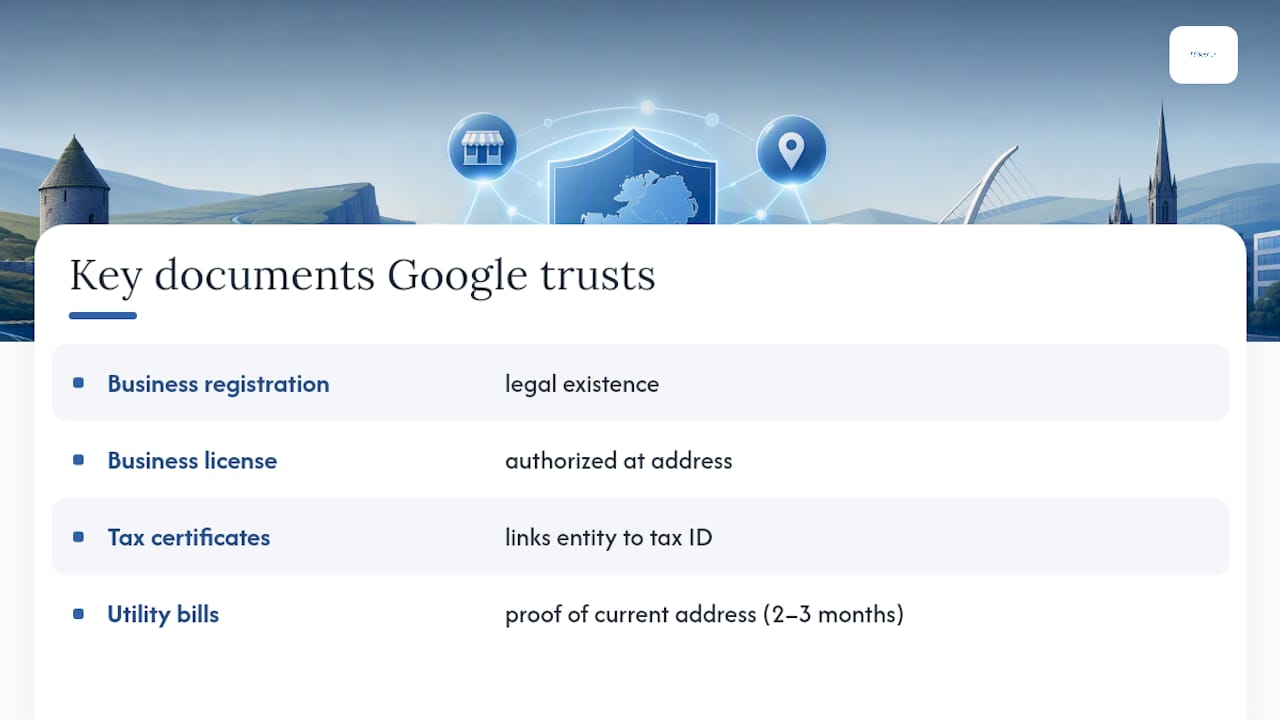
Google’s own support page lists a specific, short set of documents it considers strong evidence: business registration, a business license, tax certificates, and utility bills. These four categories show up in Google’s appeals guidance again and again, and they’re not interchangeable placeholders. Each proves something different, and reviewers are trained to look for the combination.
Business registration confirms your entity exists legally. A license confirms you’re authorized to operate that specific type of business at that address. Tax certificates tie your legal entity to a government-recognized tax ID. Utility bills, ideally dated within the last two or three months, prove you’re physically operating from the address on your listing right now, not six months ago.
Practitioner guides that track successful appeals consistently point to the same short list of documents as the most persuasive combination, which tells you Google’s reviewers are pattern-matching against a fairly narrow set of proof points, not scanning for creativity.
Formatting Your Evidence So It Doesn’t Get Rejected
A perfect document poorly formatted still fails. Follow these rules:
- Save everything as PDF where possible. Google’s form handles PDFs more reliably than phone photos.
- Make sure both your business name and address are clearly visible and legible in every scan.
- Name files descriptively:
Business_License_2026.pdf,Utility_Bill_March2026.pdf, notscan001.pdf. - Zip multiple files into one archive before upload. This isn’t just convenience; it directly protects you against the 60-minute cutoff.
- Include at least two document types showing the identical business name and address, such as a registration certificate paired with a recent utility bill, so the match is unmistakable.
Beyond the core four, secondary evidence helps round out a weak file. A signed lease, a certificate of insurance, recent invoices addressed to the business, or a bank statement with the account holder’s name and address visible can all add weight. If Google specifically requests video verification, that’s a separate process covered below, and it typically comes after a first evidence submission rather than instead of one.
Watch for the mismatches that sink otherwise solid appeals. A P.O. box on your documents when your GBP lists a physical storefront is an instant red flag. So is a virtual office address with no proof you actually conduct business there. Even something as small as “Suite 200” on one document and “Ste. 200” on another can create doubt in a reviewer’s mind, so run every document through the same consistency check you ran on your website and social profiles.
Completing the Appeal Without Losing Your Evidence
Once your documents are ready, the actual submission should take you fifteen minutes, not the anxious hour it becomes when people start hunting for files mid-form.
- Sign in to the Google account tied to the suspended profile and navigate to the Business Profile appeals tool, or the “My accounts” restrictions page if this is an account-level issue.
- Select the specific suspended profile from the list. If you manage multiple locations, confirm you’ve picked the correct one before proceeding.
- Write a short, factual explanation of why the listing complies with Google’s guidelines. One tight paragraph beats three defensive ones. State your business type, physical address, and the specific policy area the notice cited, then move directly to the evidence.
- Attach your pre-zipped evidence pack the moment the upload field appears. This is where the 60-minute rule bites people, since the timer starts when you open the evidence form, not when you finish writing your explanation.
- Submit and save the confirmation email. It’s your only record of submission timing if a dispute arises later.
Check status through the same appeals tool or your account restrictions page rather than repeatedly resubmitting, which can confuse the review queue. If your appeal comes back denied, look for a “request additional review” option before you consider filing a fresh appeal from scratch. A denial usually means your first evidence pack didn’t fully close the gap on the cited policy, so add a document type you didn’t include the first time rather than resending the same file set.
Keeping Your Profile Reinstated
Getting your listing back is only half the job. The bigger risk is triggering a second suspension within weeks because nothing about your underlying operation actually changed.
Start by re-confirming NAP consistency across your website, social profiles, and any directory you haven’t touched in a year. Mismatches that slipped through before the first suspension are exactly what will flag you again.
- Stagger significant profile edits instead of changing name, category, and hours in the same week.
- Limit how many team members have manager or owner access to the profile.
- Avoid leaning on a virtual office address unless you can document real operating activity there.
- Keep a folder of your evidence pack on hand, since reinstated listings sometimes face follow-up verification requests.
Practitioners who’ve walked clients through this note that a reinstated listing tends to carry a degree of algorithmic trust going forward, but only if you don’t immediately test that goodwill with risky edits.
If Google ever asks for video verification down the line, plan for a single continuous take: show the street number and signage, open the door, pan across the interior, hold your documents on camera for a few seconds each, and end with a brief appearance from the owner or manager confirming the business name. Practitioners who’ve reviewed successful video verification submissions stress no cuts, no edits, and good lighting throughout. For deeper ongoing profile management, a GMB optimization guide built for beauty and clinic owners covers the maintenance habits that keep a reinstated profile stable.

Pro Tip: After reinstatement, set a recurring 90-day reminder to re-check your NAP consistency and screenshot your GBP dashboard. It takes ten minutes and gives you a paper trail if anything ever gets flagged again.
Why Some Owners Hand This Off to a Specialist
DIY reinstatement fails most often on timing, not knowledge. Owners lose the evidence race because they start hunting for a utility bill after the 60-minute clock is already running, or they mismatch a “St.” for a “Street” across three directories without noticing. An agency that’s built appeal templates and staged evidence checklists in advance removes that single-attempt risk almost entirely.
Delegation makes the most sense in three situations: you’re managing suspensions across multiple locations at once, you’ve already been denied once and don’t know what to add, or you simply don’t have the internal bandwidth to chase down four document types before a countdown starts.
— Gerard
Get Your Listing Back Faster With Growth Reach Marketing
An agency can be a practical alternative to going it alone on a gbp suspension fix. Instead of racing a 60-minute upload window by yourself, you can get a team that audits your listing, assembles the evidence pack, and files the appeal narrative correctly the first time.
A typical engagement runs in four stages: a profile audit to pinpoint the likely trigger, evidence-pack assembly using the document types Google actually accepts, appeal submission and status monitoring, and a post-reinstatement check to lock down NAP consistency so the same issue doesn’t resurface. Some agencies work with salons, aesthetic clinics, and beauty brands where a suspended listing means lost bookings every single day it stays down, and speed matters as much as accuracy.
If your listing is suspended right now or you want your profile hardened against future risk, start with the Google AI Overviews SEO playbook to see how visibility recovery and long-term local search strategy connect, then reach out to get your evidence pack moving today.
Sources
Before you file anything, read Google’s own appeals and evidence guidance directly, since policy wording changes. Pair it with BrightLocal’s practitioner breakdown of evidence types and NAP audits, and keep both open while you prepare your file names and zip folder.
- Fix suspended or disabled profiles – Google Business Profile Help
- Fixing a Suspended Google Business Profile – BrightLocal
- GBP suspension guide — What to do if your GBP is suspended – Rotate Digital
- Google Business Profile Suspended? How to Verify & Recover Your GBP – Upwardbound
FAQ
Why Is Google Suspending My Business Profile?
Suspensions usually trace back to a guideline violation Google’s system flagged, such as a keyword-stuffed business name, an address that doesn’t match your physical location, duplicate listings for the same business, or too many rapid edits in a short window. Algorithmic sweeps during bug periods can also catch compliant listings by mistake.
How Long Does a GBP Reinstatement Appeal Take?
Timelines vary and Google doesn’t publish a fixed window, but response times stretch longer during known bug waves and backlogs. Filing a complete evidence pack on the first attempt is your best lever for a faster outcome, since incomplete submissions almost always mean a second round.
What Evidence Should I Prioritize First?
Lead with business registration, a business license, tax certificates, and a recent utility bill, the four document types Google’s own support page names directly. Include at least two of them showing the identical business name and address to make the match unmistakable to a reviewer.
Should I Create a New Listing While My Profile Is Suspended?
No. Creating a duplicate listing while your original is under appeal typically counts as a policy violation itself and can complicate or disqualify your reinstatement request. Wait for the appeal outcome and focus your energy on the evidence pack instead.
Can an Agency Actually Speed Up My GBP Reinstatement?
Yes, primarily by eliminating the timing failures that trip up DIY appeals, like scrambling for documents inside the 60-minute upload window. Some agencies prepare the evidence pack and staged edits in advance so the submission goes in clean the first time.