
To track conversions in Phorest, give Phorest Online Booking a standalone GA4 Measurement ID (it starts with “G-”). Then set up cross-domain tracking between your website and the Phorest booking domain. Link straight to Online Booking from your site, and test the flow with Google Tag Assistant. Do this and every booking, deposit and purchase value shows up in GA4 with the right source attached. Phorest’s own reports cover leads, completed visits and ad revenue.
This guide is for owners and managers of salons, aesthetic clinics and med spas in Ireland. It covers what counts as a conversion, what Phorest reports on its own, how to connect it to GA4, how to check the data and what Irish cookie rules mean for all of it.
TL;DR
- A Phorest conversion can be a lead marked “Appointment Scheduled”, a booking fired as a GA4 Purchase event, or a completed, paid visit. Decide which one you are measuring.
- Submit a standalone GA4 ID starting with “G-” to Phorest for Online Booking, and allow 24 to 48 hours for data to appear.
- Set up cross-domain tracking and link directly to Online Booking. Without them, bookings can land in “unassigned” or “direct” traffic.
- Test with Google Tag Assistant with blockers off. Seeing Phorest’s monitoring ID next to your own ID is expected.
- In Ireland, optional analytics and advertising cookies need prior consent, so your consent banner and your tracking must match.
Table of Contents
- What counts as a conversion for a salon or clinic
- What Phorest tracks on its own
- Connect Phorest Online Booking to GA4
- Test that bookings are recorded correctly
- Read attribution properly
- Cookie consent and data protection in Ireland
- Turn the data into better ad decisions
- Our perspective
- Get tracking set up with us
- FAQ
- Sources
What counts as a conversion for a salon or clinic
“Conversion” means different things at different points in the client’s journey. Mixing them up is the most common reason a salon’s marketing report looks wrong.
There are three levels worth separating:
- A lead action. Someone fills in a form or requests a callback. Phorest’s lead management marks a lead “Appointment Scheduled” once the appointment is booked, and “Converted Client” once it is completed and paid for.
- An online booking event. The client moves through the booking flow on your Online Booking page. In GA4 this appears as events such as Add To Cart, Begin Checkout and Purchase.
- A completed visit. The client turns up and pays. Phorest’s Performance Stats counts a visit when a client pays for a service or product. Several sales to one client on the same day count as one visit, and visits on different days count separately.
For ad spend decisions, the booking event is usually your main conversion, because it arrives fast enough to optimize on. The completed, paid visit is your truth check, because it shows whether those bookings turned into revenue. Use both.
What Phorest tracks on its own
Before you add anything, know what you already have inside Phorest.
Lead reporting. Phorest’s lead management reports new leads and a conversion rate. That rate is based on leads generated and converted during the previous 30 days. Read it as a rolling snapshot, not a calendar-month figure.
Ads Manager reporting. Phorest describes its Ads Manager as measuring online and offline bookings, including phone, walk-in and in-person bookings. It reports booking conversions, revenue, client value, impressions, reach, CTR and ROAS. Its guide separates direct revenue from the promoted service and indirect revenue from clients who book something else. That split matters in clinics. A client may click an ad for a skin consultation and later book a course of treatments.
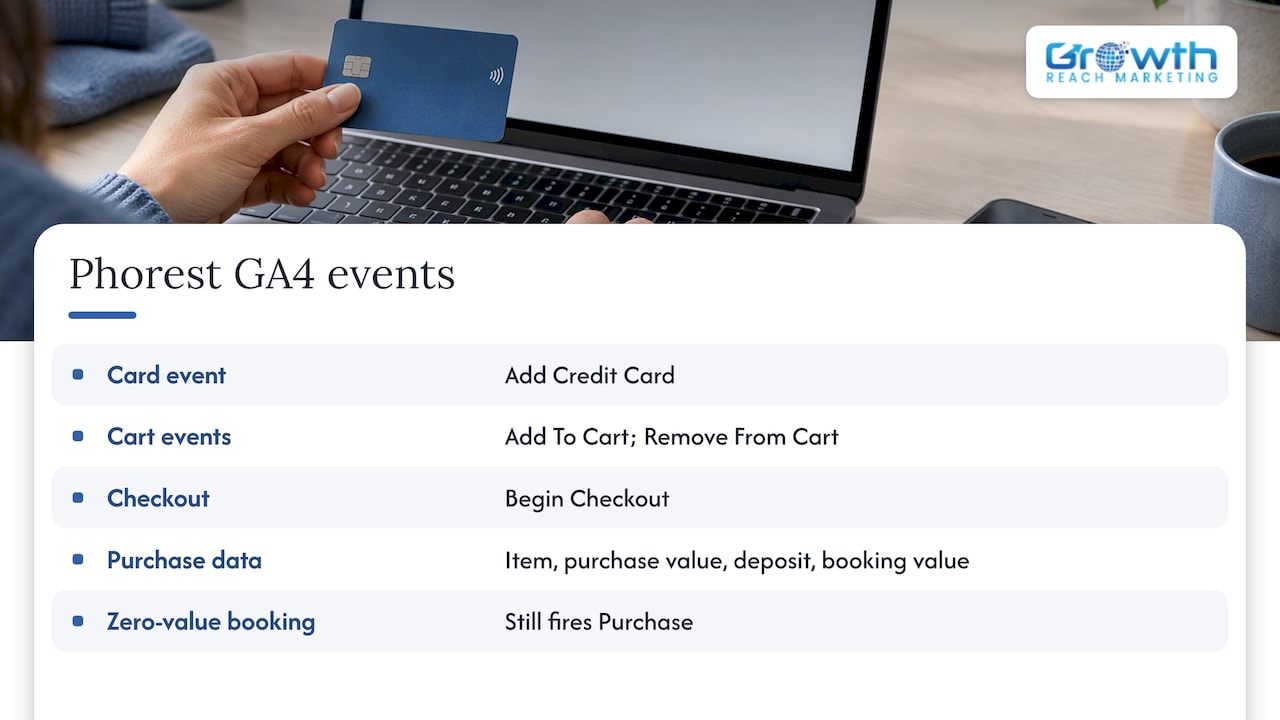
GA4 integration for Online Booking. Phorest’s Online Booking GA4 integration reports events including Add Credit Card, Add To Cart, Remove From Cart, Begin Checkout and Purchase. Purchase data carries the item, the total purchase value, and any deposit amount alongside the total booking value. Zero-value bookings still fire a Purchase event, which is useful for free consultations. Online Store and Online Gift Card reporting is not currently available through this integration, so those sales need to be read inside Phorest.
Connect Phorest Online Booking to GA4
This is the core setup. Take it step by step.
Step 1: Create or find a standalone GA4 property
You need a GA4 Measurement ID that begins with “G-”. Phorest’s guide asks for this format. If your website runs on a Google tag whose ID begins with “GT-”, that is a tag container and not the ID Phorest wants. Open your GA4 property, go to the web data stream and copy the “G-” Measurement ID.
Step 2: Submit the ID to Phorest
Follow Phorest’s official GA4 guide for Online Booking to enter the Measurement ID. After that, views, events and purchase conversions should appear in GA4. Phorest says data should begin appearing within 24 to 48 hours, so do not judge the setup on the first afternoon.
Step 3: Set up cross-domain tracking
Your website sits on one domain and Online Booking on another. If GA4 does not treat them as one journey, the visit that started on your Instagram link looks like a new, unattributed session once the client lands on the booking page. Configure GA4 cross-domain tracking so that your website domain and the Phorest booking domain are both listed. Phorest’s guide covers this requirement.
Step 4: Link directly to Online Booking
Phorest recommends linking directly to Online Booking when source attribution matters. In practice:
- Point your “Book now” buttons, Instagram bio link and Google Business Profile booking link to the Online Booking URL.
- Avoid routing clients through an embedded widget or redirect that strips the source.
- Use the same link format on every channel, with consistent UTM parameters on paid campaigns.
Step 5: Mark the right event as a key event in GA4
In GA4, mark Purchase as your key event for bookings. If you offer free consultations, remember that those also fire Purchase with a zero value, so your reporting will count them as bookings but not as revenue. Our walkthrough of GA4 booking events goes deeper on naming and structure.
Test that bookings are recorded correctly
Do not trust a setup you have not tested. Phorest’s guide gives a clear method:
- Open Google Tag Assistant and turn off ad blockers and privacy extensions temporarily.
- Accept all cookies on your site, so consent does not block the tags.
- Move through the booking flow from your website as a client would.
- In Tag Assistant, inspect the GA4 IDs loaded and the hits sent. Your salon’s ID should be there.
- Wait 24 to 48 hours before judging the reports.
If your ID is missing, check that your “G-” ID loads independently and is not only present as a destination inside a “GT-” tag. Phorest’s guide treats that as the common cause.
You will probably see a second ID, which is Phorest’s own monitoring ID. That is expected, and it does not by itself mean your bookings are duplicated. If you suspect true duplication, compare GA4 Purchase counts for a week against bookings made online in Phorest for the same period.
A simple monthly reconciliation
| Check | Where to look | What a healthy result looks like |
|---|---|---|
| Online bookings made | Phorest booking reports | Close to GA4 Purchase count |
| Revenue from campaigns | Phorest Ads Manager | Direct and indirect revenue both visible |
| Leads converted | Phorest lead management | Rate matches your own count of booked leads |
| Traffic source of bookings | GA4 acquisition reports | Few “unassigned” or “direct” bookings |
Expect small gaps. Clients who decline cookies will not appear in GA4, while Phorest still records their booking. A gap in that direction is normal.
Read attribution properly
A typical booking journey: a client sees an Instagram ad, visits your website, leaves, searches your salon name a day later and books. GA4 will assign credit according to its attribution model, and Phorest Ads Manager will report on its own basis. The two will not match exactly, and that is fine as long as you know why.
The practical rules:
- Preserve the journey. Without cross-domain tracking, conversions may be attributed to unassigned or direct traffic. A high “direct” share of bookings is often a setup problem, not a loyal audience.
- Count phone and walk-in bookings separately. GA4 only sees online journeys. Phorest Ads Manager describes measuring offline bookings too, so use it for the full picture.
- Judge ads on revenue, not clicks. Use ROAS and the direct versus indirect split rather than click-through rate alone.
- Compare over weeks. Treatment bookings can be planned days ahead, so daily numbers mislead.
For a broader view, see our guide to tracking salon marketing results that matter, and for clinics, tracking med spa campaign ROI.
Cookie consent and data protection in Ireland
Tracking only works legally if consent is handled correctly. The Data Protection Commission’s guidance says the ePrivacy Regulations generally require prior, freely given, specific, informed and unambiguous consent before non-exempt analytics or advertising cookies store or access information on a user’s device. Regulation 5(3) is the provision behind this.
What that means for your salon website:
- Do not load optional analytics or advertising tags before the visitor consents.
- Give clear information and separate choices for different purposes, such as analytics and advertising.
- Make rejecting or managing cookies as prominent as accepting.
- Where personal data is processed, meet GDPR transparency requirements, which means your privacy policy should name the tools you use.
Treatment bookings can reveal health-related details, so keep what you send to analytics and ad platforms minimal. Do not put client names, emails or treatment notes into URLs or event parameters. If you are unsure how your setup should be configured, ask a data protection professional or solicitor to review it.
Turn the data into better ad decisions
Once tracking is clean, the numbers tell you where to act.
- High clicks, few bookings. Check the booking page on mobile, the first screen of services and the deposit step. Our guide on booking conversion optimization covers these fixes.
- Bookings but low revenue. Look at which services are booked and whether indirect revenue shows clients moving to higher-value treatments.
- Good Google results, weak Instagram results. Compare cost per booking, then review your Instagram ads targeting and creative.
- Search campaigns. Pair your booking data with Google Ads best practices for salons and a sensible Google Ads budget.
Our perspective
Most salon owners we speak with are not short of data. Phorest already holds bookings, deposits, visits and client value. What is often missing is the connection between that data and the channel that produced it.
We build marketing for salons, aesthetic clinics and beauty brands, and we start from the booking, not the click. A tracked booking with a source attached lets you say which ad, which search and which post earned its place in the budget.
Our approach is data-driven and ethical. That means consent handled properly, no personal data pushed into ad platforms, and reports an owner can read without a glossary. It also means working with you personally, as an Irish-based team, so the tracking reflects how your business actually takes bookings, including phone and walk-ins.
When tracking is right, ad management, SEO and automated follow-ups all get easier to improve, because you can see what each one is doing.
Gerard
Get tracking set up with us
If you would rather not spend a weekend inside GA4 and tag settings, we can help. Growth Reach Marketing manages Facebook and Instagram ads, social media, SEO and AI search visibility, lead generation and conversion optimization, and AI enquiry handling and booking automation for salons and clinics. We tie each of them back to booked appointments.
See our services or get in touch to talk through your Phorest setup.
FAQ
What is conversion tracking?
Conversion tracking measures how many visitors complete a valuable action, such as booking an appointment, and links that action to the channel that drove it. For a salon, the most useful conversion is a booking, followed by a completed, paid visit.
Does Phorest support Google Analytics 4?
Yes. Phorest’s Online Booking accepts a GA4 Measurement ID beginning with “G-”. After you submit it, views, events and purchase conversions appear in GA4, usually within 24 to 48 hours according to Phorest. Online Store and Online Gift Card reporting is not currently available through this integration.
Why do my Phorest bookings show as direct or unassigned traffic?
The usual cause is missing cross-domain tracking between your website and the Phorest booking domain. Add both domains in GA4’s cross-domain settings and link directly to Online Booking from your site and social profiles.
Do I need cookie consent to track bookings in Ireland?
Generally yes, for analytics and advertising cookies that are not exempt. The DPC’s guidance calls for prior, informed consent, clear information and equally prominent accept and reject choices. Have your consent banner reviewed alongside your tag setup.
Sources
- Tracking Online Booking Conversions with Google Analytics 4 (Phorest Support)
- Lead Management: client lead form and call back option (Phorest Support)
- Performance Stats report overview (Phorest Support)
- Unlock Your Salon, Spa, or Clinic’s Potential with Phorest Ads Manager
- Phorest Ads Manager Guide (PDF)
- Guidance Note: Cookies and other tracking technologies (Data Protection Commission)