A clinic win-back email is a care-first message that invites a lapsed patient to rebook, and the one thing to do right now is send a single pilot check-in. Keep it brief, warm and non-pushy. Sign it with a named practitioner, add a one-click rebooking link and a visible unsubscribe, then measure how many people book before you build anything bigger.
TL;DR:
- Set the inactivity window from your clinic’s usual return interval, then segment by service, clinical risk, payment status, and engagement before choosing a message.
- Under Irish rules, recalls tied to ongoing care differ from promotional emails; check consent records before marketing, and offer a working unsubscribe in every message.
- Keep diagnoses, test results, and medication names out of ordinary email; use Healthmail or a patient portal when clinical details must be shared.
- Send a short sequence, stop immediately after booking or opting out, and judge the pilot by paid appointments and unsubscribes before expanding.
- Reminder evidence is mixed: pair emails with easy booking and monitored replies, because reminders alone may not improve attendance consistently.
Table of Contents
- Why do win-back emails matter for clinics?
- Which win-back email templates can you copy today?
- When should you send, and how do you segment by specialty?
- What messaging rules protect trust and increase bookings?
- What do Irish rules say about emailing lapsed patients?
- What technical setup improves deliverability and keeps data safe?
- How do you automate win-back campaigns without creating problems?
- How do you measure whether win-back emails are working?
- When should a clinic outsource win-back campaigns?
- How can we help you build compliant, conversion-focused win-back campaigns?
- FAQ
- Sources
Why do win-back emails matter for clinics?
A lapsed patient is not a lost cause. Someone who has already walked through your door, trusted a practitioner and paid for care is a different prospect from a stranger who clicked an ad. That is the business case. The clinical case is just as strong: when a patient drifts away from a treatment plan, a follow-up or a maintenance schedule, their care has a gap in it, and a well-timed message can close that gap.
This is why we frame every reactivation message as an extension of the clinical relationship, not a promotion. Coupon blasts tend to fail in clinics because they turn a care relationship into a transaction. A message that opens with a discount tells the patient you noticed their absence only because of revenue. A message that opens with “we wanted to check in on how you’re getting on” tells them someone remembers their goals.
The evidence for email-based contact is encouraging but honest about its limits:
- A pilot study in the Journal of Medical Internet Research found that patients enrolled in a health portal that sent email reminders arrived for appointments at significantly higher rates and had lower no-show rates.
- A systematic review of appointment reminder systems concluded that simple reminders improve attendance modestly, and that reminders combined with extra personalized information often outperform plain ones.
- A pragmatic trial of behavioral nudges in reminder letters found no overall effect on attendance, and its authors cautioned that reminders alone may not be enough without supportive administrative processes.
Read together, these results point to the same lesson: the message matters, but so does what happens after the patient replies. A friendly email that lands in an unmonitored inbox, or links to a clunky booking page, wastes the effort. We cover that operational side later in this article.
If you want a broader view of how follow-up sequences pay off, our guide to med spa email nurturing benefits shows how consistent email contact keeps a calendar full.
Which win-back email templates can you copy today?
Below are five templates, each with a few subject-line options. Adapt the wording to your own voice and swap in your real practitioner names. Keep every message short enough to read quickly on a phone.
Template 1: The gentle check-in
Subject lines: “Checking in, {first name}” / “How have you been since your last visit?” / “A quick hello from {clinician}”
Hi {first name}, it’s {clinician} from {clinic}. It’s been a while since your {treatment} and I wanted to see how you’re getting on. If you’d like to pick things up again, you can choose a time here: {booking link}. No pressure at all, and if you’d prefer not to hear from us, you can unsubscribe below.
Template 2: The clinical recall
Subject lines: “Time for your follow-up, {first name}” / “Your review with {clinician} is due” / “Keeping your care on track”
Hi {first name}, based on your last appointment, a follow-up is a good idea around now. A short review lets {clinician} check progress and adjust your plan if needed. Book a time that suits you: {booking link}.
Template 3: The maintenance reminder
Subject lines: “Is it time to top up?” / “Maintaining your results, {first name}” / “Your next session with {clinician}”
Hi {first name}, many people find results hold best with a regular maintenance visit. If you’d like to schedule yours, {booking link} shows the next available slots with {clinician}.
Template 4: The practitioner update
Subject lines: “News from {clinic}” / “{clinician} has new availability” / “Something new since your last visit”
Hi {first name}, a quick update: {clinician} now has {new service or new hours}. If it’s relevant to what you came to see us for, we’d be glad to talk it through. Book here: {booking link}.
Template 5: The final courtesy close
Subject lines: “Should we stay in touch?” / “Last note from {clinic}” / “One last check-in, {first name}”
Hi {first name}, we’ve reached out a couple of times and don’t want to fill your inbox. This is our last message for now. If you’d like to book, {booking link} is always open. If not, no problem at all, and you can unsubscribe below.
Personalization tokens to use, and what to leave out
Safe, useful tokens include:
- First name
- Named clinician
- Clinic location
- A general description of the last service, such as “your last visit” rather than clinical detail
Leave clinical specifics out of plain email. Test results, diagnoses, medication names and anything a stranger could learn about a patient’s health by glancing at the message do not belong in a standard email. We explain why in the compliance section below.
Pro Tip: Send the first version to yourself and two staff members and open it on a phone. If the booking link takes more than two taps to reach a calendar, fix the link before you send a single patient email.
When should you send, and how do you segment by specialty?
There is no universal inactivity window. The right gap depends on how often patients normally return. As rules of thumb, which you should adapt to your own data:
- Treatments patients repeat often, such as injectables or regular therapy sessions: consider a window suited to how often patients typically return.
- Maintenance and review care: consider a window suited to the usual interval between visits.
- Specialties with naturally long gaps between visits: a longer interval may be appropriate before sending a nudge.
Look at your own booking history first. If most of your regular patients return on a predictable schedule, someone who has been away substantially longer than that is already a clear outlier, whatever any rule of thumb says.
How to segment your lapsed list
Sending one message to everyone who has not visited in a while wastes the personal touch that makes win-back work. Split your list by:
- Last treatment or service. A patient who had a one-off procedure needs a different message from one on an ongoing plan.
- Clinical risk. Anyone who may need clinical follow-up should get a care-led recall from a clinician, not a marketing-style message.
- Payment status. Hold outreach for patients with an unresolved balance until your front desk has dealt with it, so a friendly email does not land in the middle of a billing issue.
- Engagement signals. Patients who still open your emails or follow your social accounts are warmer than those who have gone completely silent.
A simple cadence, and when to stop
A short sequence works better than a long one. Here is a cadence that respects patients’ inboxes:
- Send the gentle check-in (Template 1) first.
- If there is no response after a suitable interval, send the clinical recall or maintenance reminder that matches the segment.
- Later, send the practitioner update if you have something genuinely new to say.
- Close with the courtesy message (Template 5), then stop.
- Move anyone who has not responded into a low-frequency list for occasional news.
- Stop immediately for anyone who books, replies with a stop request or unsubscribes.
For a more detailed multi-touch framework that mixes email with phone calls, see our six-touch reactivation campaign.
What messaging rules protect trust and increase bookings?
The difference between a win-back email that works and one that irritates comes down to voice and restraint.
- Lead with care, not urgency. Phrases like “last chance” or “act now” read as sales pressure. A patient who feels pushed is more likely to unsubscribe than to book.
- Match the message to the reason for inactivity. A patient who finished a course of treatment needs a different note from one who stopped halfway. If you know the likely reason, say so gently.
- Personalize sparingly. A first name and a clinician’s name make the message feel human. Anything more detailed risks disclosing sensitive information. Irish medical guidance, including the Irish College of General Practitioners guidance, advises against sending identifiable clinical information by unencrypted email and points to Healthmail or patient portals instead.
- Make the call to action effortless. One button, one link, or a single phone tap. Every extra step costs bookings. Our piece on clinic online consultation marketing shows how booking-page design affects conversion.
- Show the unsubscribe clearly. A visible opt-out builds trust and keeps you on the right side of the rules.
- Honor suppression the moment it happens. Anyone who opts out, whether by link, reply or in person at the front desk, comes off every list immediately.
A vendor guide from ClinikEHR makes a similar point: warm, low-pressure messages with a single rebooking step, a pilot sample first, and automatic suppression for anyone who opts out.
Using AI for personalization and send times
AI tools can help, within limits. They are useful for drafting variations of a subject line, suggesting send times based on when each patient has opened past emails, and flagging which segment a patient belongs to. They should not be fed clinical notes, and a human should read every template before it goes out. Treat AI as a drafting and timing assistant, not as the voice of your clinic.
Message frequency beyond the first sequence
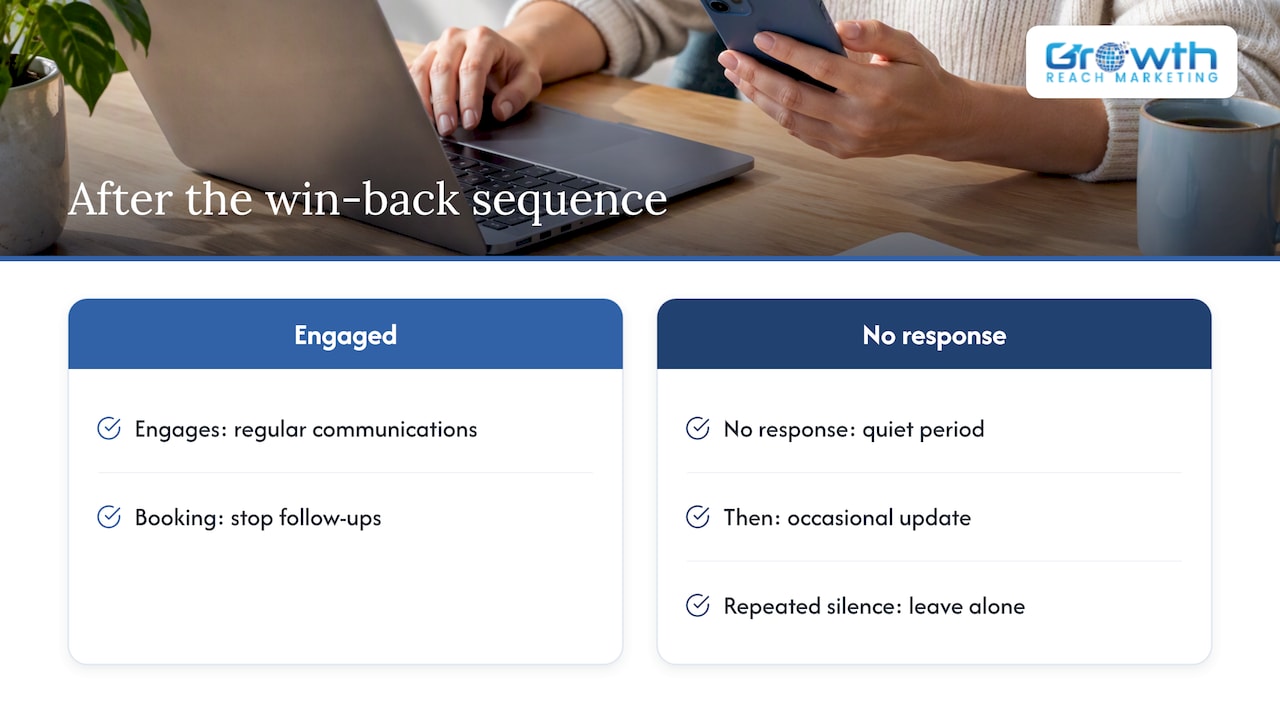
Once the win-back sequence ends, resist the urge to keep emailing the same people every week. For patients who did not respond, a quiet period followed by an occasional update is kinder to their inbox and your sender reputation. Anyone who engages moves back into your regular patient communications. Anyone who stays silent through repeated sends should eventually be left alone, which protects against fatigue and keeps your list healthy.
Pro Tip: Write down your stop rules before launch: opt-out, booking, and a fixed number of non-responses. Staff who know exactly when to stop will avoid sending unwanted follow-up messages.
What do Irish rules say about emailing lapsed patients?
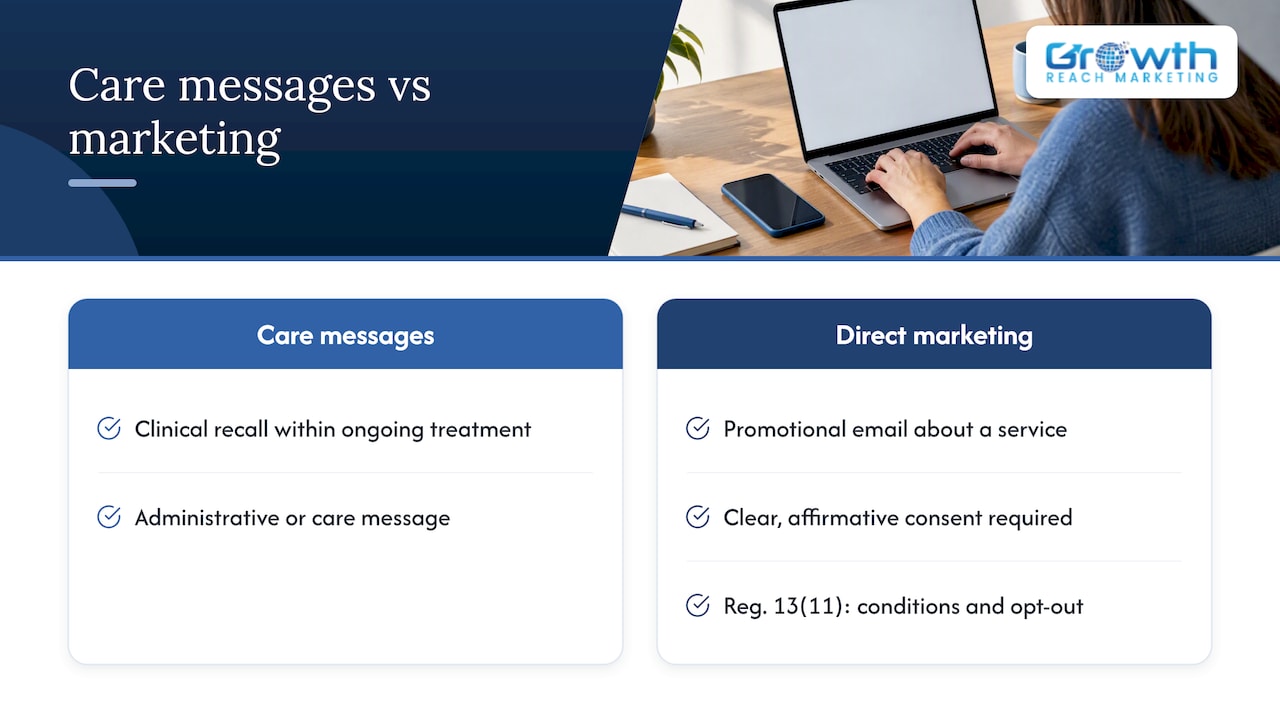
Clinics in Ireland need to separate two kinds of message. An administrative or care message, such as a clinical recall that is part of ongoing treatment, is different from electronic direct marketing, such as a promotional email about a service. The distinction matters because the ePrivacy Regulations (SI 336/2011) set stricter conditions for marketing.
According to the Data Protection Commission’s guidance on electronic direct marketing, the rules require clear, affirmative consent for electronic direct marketing, and Regulation 13(11) sets conditions under which you may market to existing customers without fresh consent.
Under Regulation 13(11), marketing to existing customers without fresh consent is only possible when specific conditions are met, and an opt-out must be offered. Data Protection Commission guidance sets out those conditions, so check them against your own consent records before sending.
In practice, that means the same email can be fine for one patient and risky for another, depending on how you collected their details and what you are offering. Practical guidance from Ask Brigid on GDPR patient communication notes that proactive recalls or promotions may require explicit opt-in.
A practical compliance checklist
- Audit your consent records. Know which patients opted in, when and how.
- Include an unsubscribe in every message. Test it works before every campaign.
- Log verbal opt-outs immediately. If a patient tells reception they do not want emails, record it that day.
- Keep clinical detail out of ordinary email. Use Healthmail or encryption when clinical information must be shared, as the Royal College of Physicians of Ireland guidance recommends.
- Record explicit requests. If a patient asks to receive results by email, note their informed request, in line with ICGP guidance on processing patient data.
For a deeper walk-through of the soft opt-in tests and the fines at stake, read our guide to GDPR email marketing for Irish salons and clinics. This article is general information, and your own data protection adviser should review your specific setup.
What technical setup improves deliverability and keeps data safe?
A beautifully written email does nothing if it lands in spam. A short technical checklist protects both deliverability and patient privacy.
- Authenticate your domain. Set up SPF, DKIM and DMARC so mailbox providers can confirm your messages are genuine, and send from a consistent, recognizable sender name.
- Verify addresses before sending. Remove typos and dead addresses. Sending to bad addresses damages your sender reputation and, if a message reaches the wrong person, can become a data breach.
- Keep clinical details out of plain text. The ICGP and RCPI guidance cited above recommends Healthmail, or encrypted attachments when Healthmail is not feasible, for identifiable clinical information.
- Verify authenticity. Confirm that the recipient address really belongs to the patient, particularly for anything beyond a simple check-in.
- Switch off auto-complete on address fields. An autocompleted wrong recipient is one of the most common ways patient emails go astray.
- Test every link. Click the booking link, the phone link and the unsubscribe link in the live email, on both desktop and mobile.
- Confirm the unsubscribe path works end to end. The opt-out should remove the patient from the list without a login or a reply.
None of this is exciting, but it is where many clinic campaigns quietly fail. A test send to a few staff mailboxes, ideally across different providers, catches most problems before patients see them.
How do you automate win-back campaigns without creating problems?
Automation saves time only once the process works manually. Start small, prove the workflow, then scale.
The aim is a closed loop: every reply, booking and opt-out gets handled without anyone remembering to check an inbox. Here is the order we recommend:
- Run a manual pilot with a small list and send each message yourself, so you see how patients respond.
- Write down every kind of reply you receive: booking requests, questions, stop requests, out-of-office notices.
- Build routing rules that detect keywords such as “book”, “schedule” or “stop” and push the message to the right place, whether that is a booking workflow or the opt-out list.
- Add approval gates for anything involving clinical recommendations or charges, so a clinician or manager signs off first.
- Set automatic suppression so that any opt-out removes the patient from every active sequence at once.
- Keep an audit log of consent and opt-out events, with dates, so you can show what happened if a patient or regulator asks.
- Review the first automated batch by hand before letting the system run unattended.
The reasoning behind the pilot first approach appears in the ClinikEHR guide, and the nudge trial mentioned earlier supports the broader point that reminders work best with administrative support behind them. Our guide to email nurture sequences for aesthetics clinics covers how sequences and automation fit together.
Pro Tip: Assign one named person to check the reply and opt-out queue regularly during the initial rollout. Automation handles volume, but a human catches the odd message the rules miss.
How do you measure whether win-back emails are working?
Opens are the easiest number to see and the least useful. What matters is whether patients came back. Track these:
- Rebooking rate: the share of recipients who rebook within a defined period after the send.
- Reply rate: useful because replies often signal a booking in progress or a question you can answer.
- Conversion to a paid appointment: a booking that is later cancelled is not a win.
- Unsubscribe rate: a spike tells you the tone or frequency is wrong.
What to A/B test
Change one thing at a time and measure bookings, not just opens:
- Subject line variants, such as a name-led line against a question
- Personalized against generic wording
- Call-to-action format, such as a button against a plain link or a phone tap
- Send day and time
Because an email can be opened without being read, a subject line that wins on opens but loses on bookings is not a winner. Judge every test by the lift in appointments.
Benchmarks and when to scale
We do not quote industry averages here, because list quality, specialty and booking systems vary too much for a single number to be fair. Build your own baseline from your pilot instead. Scale a campaign when your pilot shows steady rebooking, a low unsubscribe rate and no operational bottlenecks such as unanswered replies. If bookings are flat but unsubscribes are rising, fix the message before expanding the list. For ideas on tying email results to wider marketing numbers, see our guide on tracking results that matter.
When should a clinic outsource win-back campaigns?
Plenty of clinics can run a first pilot in-house, and I would encourage that. Sending a small batch of personal check-ins teaches you more about your patients than any report. There are a few situations when I think bringing in help pays for itself.
The first is capacity. If nobody on your team has the hours to monitor replies, update lists and test subject lines, a campaign decays within weeks. The second is integration: connecting your booking system, your email platform and your suppression lists so a reply becomes a confirmed appointment without manual copying. The third is compliance. If you are unsure whether your consent records would stand up to a review, get them audited before you send anything promotional.
An agency can compress the testing cycle and build secure automation without adding to your front desk’s workload. But no agency can fix a clinic that does not know who its lapsed patients are or has not decided who answers the replies.
Before any launch, I recommend checking your consent records, choosing a small pilot list, and testing the booking link from a patient’s point of view.
— Gerard
How can we help you build compliant, conversion-focused win-back campaigns?
If you would rather not carry this alone, we build and run these programs for clinics and salons. Our focus is on the beauty and aesthetics industry, and we work with a personal, Irish-based approach that puts ethical, data-driven results first. Here is what we can do for you:
- Build email nurture sequences and automation that re-engage lapsed patients with care-first messaging
- Run Facebook and Instagram ads that bring lapsed patients back into view alongside your emails
- Manage your social media and LinkedIn presence so your clinic stays familiar between visits
- Fix booking pages and conversion points so a single click turns interest into an appointment
The most useful first step is either a consent audit or a small pilot campaign built and tested with approval gates your staff control. If either sounds helpful, visit our services page to get in touch, and we will tell you plainly what we would do first for your clinic.
This article is general information, not a substitute for advice from a qualified doctor. Consult a qualified healthcare professional about your own circumstances before acting on anything here.
FAQ
How long should a clinic wait before sending a win-back email?
It depends on how often patients normally return. A suitable starting point depends on how often patients typically return for the treatment, and your own booking data should set the real window.
Do clinics need consent to send win-back emails in Ireland?
Care-related recalls and promotional messages are treated differently. The Data Protection Commission’s electronic direct marketing guidance explains when consent is needed and the conditions for existing customers. Check your own consent records before sending anything promotional.
Can you include treatment details in a win-back email?
Keep it general. Standard email is not a secure channel for identifiable clinical information, so refer to “your last visit” and use Healthmail or a patient portal when clinical detail is needed, as RCPI guidance recommends.
Do email reminders actually bring patients back?
Evidence is encouraging but mixed. A portal and email reminder pilot found higher arrival rates, while a large nudge trial found no overall effect, so combine reminders with easy booking and follow-up processes.
How many win-back emails should you send?
A short sequence with sensible spacing is usually preferable to prolonged outreach. Stop at once for anyone who books or opts out, and close with a courtesy message before moving silent patients to a low-frequency list.
Sources
- Electronic Direct Marketing
- Irishcollegeofgps
- Journal of Medical Internet Research – Impact of Health Portal Enrollment With Email Reminders on Adherence to Clinic Appointments: A Pilot Study
- GDPR Patient Communication Rules Ireland | Ask Brigid