Yes, Fresha supports Google Ads conversion tracking by letting you paste a Conversion ID into its native add-on, which then sends completed bookings to Google Ads as conversion events. The one catch: a booking only counts when the client clicked your ad before booking. To get started, copy your Conversion ID from Google Ads and paste it into Fresha under Add-ons > Google Ads.
TL;DR:
- Create a website conversion action, not a call or app action, then add its Conversion ID separately to every Fresha location you want tracked.
- Use a dedicated booking action with a count setting of One; Fresha reports completed bookings but cannot track service choices or abandoned appointments.
- Verify tracking by clicking a live ad and completing a test booking, then allow up to 48 hours before troubleshooting missing conversions.
- Because Fresha hosts the booking page, tracking covers completed bookings only; compare weekly booking exports with Google Ads counts to catch discrepancies.
Table of Contents
- Setting Up Google Ads Conversion Tracking in Fresha
- How Do You Verify Fresha Conversions Are Reaching Google Ads?
- Why Fresha’s Hosted Booking Pages Limit What You Can Track
- Store Visits and Offline Conversions: What Google Can Measure on Its Own
- Turning Fresha Conversion Data Into Better Bidding Decisions
- When Native Tracking Is Enough, and When It Is Not
- Getting Your Fresha and Google Ads Tracking Set Up Right
- FAQ
- Sources
Setting Up Google Ads Conversion Tracking in Fresha
Before touching Fresha, you need a conversion action in Google Ads that actually produces a Conversion ID. Website conversion actions, such as “Purchase” or “Book an appointment” goals, generate this ID; call-only or app conversion actions do not, so if you are starting from scratch, create a website conversion action first.
Once that conversion action exists, Google Ads will show you a Conversion ID and a conversion label, usually under Tools > Conversions > [your action] > Tag setup. You only need the Conversion ID for Fresha, not the full tag snippet, since Fresha handles the sending on its end.
With that number copied, here is the exact path inside Fresha:
- Go to Add-ons, then find Google Ads and select Set up now.
- Paste your Conversion ID into the field provided.
- Choose which location this Conversion ID applies to if you manage more than one.
- Click Enable to turn on tracking for that location.
- Repeat the process for each additional location, using a separate Conversion ID per location if you want location-level reporting in Google Ads.
According to Fresha’s own documentation, you can connect a Conversion ID per location, and locations without an ID simply will not send conversion data at all. If you run a single-location business, this step is quick. If you manage a chain of clinics or salons, think carefully about whether you want one shared Conversion ID across all locations (simpler reporting, less granularity) or separate IDs per site (more setup work, but you can see which location is driving bookings from ads).
A common mistake at this stage is reusing an old conversion action that was built for a different purpose, like a newsletter signup or a contact form. Reusing it will technically work, but it muddies your reporting because bookings get mixed in with unrelated actions. It is cleaner to create a dedicated conversion action labeled specifically for Fresha bookings and check its settings before you go live: confirm the category is set appropriately (often “Book an appointment” or “Purchase”), the value settings match how you want to measure bookings (flat value, no value, or a value per booking), and the count setting is “One” so that repeat visits to the confirmation page do not inflate your numbers.
If you are advertising more than one service line or location and want to see how conversion actions should be structured in general, our guide to Google Ads conversion actions for salon owners walks through how to pick the right action type and settings before you ever touch Fresha.
One detail that trips people up: leaving the Conversion ID field blank at a given location does not throw an error. Fresha simply will not send any conversion data for that location, and you will see zero bookings attributed to ads there even if the location is actively getting ad traffic. Double-check every location you expect to track, not just your main one.
How Do You Verify Fresha Conversions Are Reaching Google Ads?
The only reliable way to confirm your setup works is to run an end-to-end test. Click your own live ad (or use a method that replicates a genuine ad click), browse to the booking page, and complete a real test booking on Fresha using a service you can later cancel or refund. Fresha’s help documentation specifically recommends testing a booking right after clicking your ad to confirm the connection is live.
After the test booking, give it time before panicking. Google Ads does not show conversions instantly: reporting delays and conversion modeling can take anywhere from a few hours to a day or two depending on your account’s conversion volume and settings.
Where to check once some time has passed:
- Open Tools > Conversions and look at the specific conversion action tied to Fresha.
- Check All conversions in your campaign or ad group columns, since a test booking might count there even if it is filtered out of “Conversions” for bidding purposes.
- Use the Diagnostics tab on the conversion action if Google Ads flags an issue, such as no recent conversions or a tag health warning.
Pro Tip: Run your test booking from a device and browser you do not normally use for admin tasks, so you are seeing the flow exactly as a real customer would.
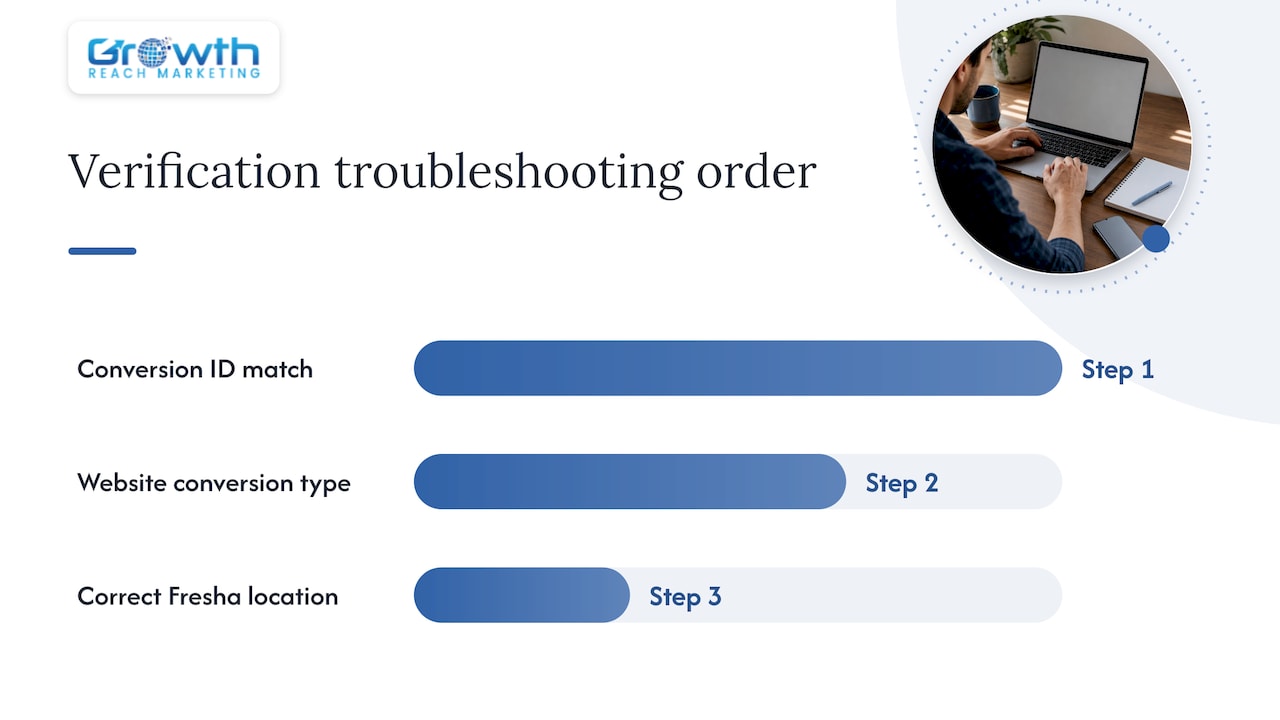
If nothing shows up after 48 hours, work through the likely causes in order. First, re-check that the Conversion ID in Fresha matches the Conversion ID in Google Ads character for character, since a single mistyped digit will silently break tracking. Second, confirm the conversion action in Google Ads is a website-based action and not a call or import type, since only website actions use a Conversion ID this way. Third, check that the location in Fresha where you made your test booking is actually the one you added the Conversion ID to, especially if you manage multiple locations.
Why Fresha’s Hosted Booking Pages Limit What You Can Track
Fresha’s booking flow lives on Fresha’s own domain, not yours, which has real consequences for tracking. Because the confirmation page is hosted on Fresha’s infrastructure, you cannot place your own tracking tags directly on it the way you would on a page you control. That rules out firing custom page-level events for things like which service was selected, how long someone spent browsing time slots, or whether they abandoned the booking partway through.
What Fresha does instead is send completed bookings server-side straight to Google Ads as a conversion event. That approach is dependable for the core job, counting a booking as a booking, but it is a black box for anything more granular. You get a conversion count, not a breakdown of on-page behavior.
A practical reconciliation workflow closes most of the gap and benefits from thoughtful lead generation and website build considerations.
- Export your completed bookings from Fresha on a weekly basis, including the date and, if available, the referral source.
- Pull the matching conversion count from Google Ads for the same date range and conversion action.
- Compare the two totals, keeping in mind that your attribution window and conversion model in Google Ads will cause some natural variance.
- Investigate any gap larger than a small percentage, checking for tracking template issues, missed test bookings, or ad blockers on the client side.
For businesses that need more than a binary booking count, there are a few paths worth considering, each with real overhead. UTM parameters appended to your ad URLs can help you see which campaign drove traffic to Fresha in your own analytics, even if they do not flow into the Fresha conversion itself. Final URL suffixes in Google Ads can achieve something similar without cluttering your destination URL. Offline conversion imports are the most powerful option but require exporting booking data and manually uploading it to Google Ads on a schedule, which is realistic for a larger clinic but often more than a single-location salon wants to manage.
Store Visits and Offline Conversions: What Google Can Measure on Its Own
Store visits is a separate, automated feature from the Fresha integration, and it is worth understanding the difference. Google models store visits using aggregated, privacy-safe data from signed-in users who have Location History enabled, combined with survey-based verification to improve accuracy. It is not a direct count of every person who walked in, it is a statistical estimate.
Several eligibility factors determine whether your account sees store visit data at all:
- Your Business Profile needs to be verified and linked to your Google Ads account.
- Location assets need to be enabled on your campaigns.
- Your account needs sufficient click and traffic volume, since Google will not report store visits for accounts below its data thresholds.
Google’s own guidance confirms that store visits are only generated automatically once an account meets strict privacy and volume thresholds, which explains why many smaller advertisers never see this metric populate at all, according to Google Ads Help.
If store visits are missing from your reports, a few levers can help. Linking and verifying your Business Profile is the first step, followed by enabling location assets across your active campaigns. Running a Performance Max campaign with a store visit goal can also help, since Google designs that campaign type to pull in the signals it needs for store visit modeling. Beyond that, increasing your click volume over time is often the real unlock, since even a well-configured account will not show store visits if traffic is too low to meet Google’s reporting thresholds. Expect a reporting lag here too: even eligible accounts can take several weeks to start showing store visit data.
Turning Fresha Conversion Data Into Better Bidding Decisions
Once Fresha conversions are flowing into Google Ads reliably, the next question is how to use that data to actually improve campaign performance. The starting point is making sure the conversion action tied to Fresha, the one with a working Conversion ID, is the one you are optimizing toward in your bidding strategy, rather than a vanity metric like clicks or landing page views.
A few practices make a meaningful difference:
- Assign a conversion value to bookings where possible, even a flat average value per appointment, so Smart Bidding strategies that use value-based optimization have something to work with.
- Separate high-intent conversion actions from softer ones, so a completed booking is not diluted in the same column as something like a newsletter signup.
- Give automated bidding time to learn rather than making changes every few days based on early results.
- Set up a recurring reconciliation check, weekly or biweekly, between Fresha’s booking export and Google Ads conversion counts to catch drift before it affects your budget decisions.
On that third point, Google Ads’ own guidance on bidding strategies is direct: automated bidding needs sufficient conversion data to learn, and judging cost per acquisition too early, before the algorithm has stabilized, tends to produce a misleading picture. A campaign that looks expensive in its first week often settles once Smart Bidding has enough signal to optimize properly.
Pro Tip: If your Fresha bookings vary a lot in value (a quick blow-dry versus a full color treatment), consider a lead-score or average-value proxy rather than treating every booking as identical, since that gives Smart Bidding a sharper signal to optimize against.
For accounts where campaign structure itself might be working against clean measurement, reviewing how your campaign structure is organized can reveal why conversion data is spread too thin across too many ad groups to give Smart Bidding a clear signal. And since booking value is only part of the picture, pairing Fresha’s native conversions with a periodic server-side export, even a simple spreadsheet reconciliation, helps protect your budget from being optimized against an incomplete signal. This matters more as spend increases: a small account can tolerate some noise, but a high-spend account making automated bidding decisions on partial data can waste real money fast.
When Native Tracking Is Enough, and When It Is Not
For most salons and smaller clinics optimizing for a steady stream of bookings, the native Fresha integration does its job: it is quick to enable, requires no developer, and gives Google Ads a clean conversion signal to bid against. We would not tell a single-location business to overbuild its measurement stack when the out-of-the-box connection already answers the core question, did this ad produce a booking.
The calculation changes once you need more than a yes-or-no signal, when you are running multiple locations with different service values, want lead scoring instead of a flat booking count, or need to reconcile several traffic sources into one attribution view. At that point, server-side imports and a managed measurement setup earn their complexity. The trade-off is speed versus fidelity, and for high-spend accounts, we would rather see the extra setup time invested early than discover a budget was optimized against noisy data months in.
— Gerard
Getting Your Fresha and Google Ads Tracking Set Up Right
Setting up the Conversion ID is the easy part. Making sure it is configured correctly across every location, verified with a real test booking, and reconciled against your actual booking data on an ongoing basis is where most accounts quietly lose budget efficiency. That is the gap we close for salons, clinics, and beauty brands running paid ads.
Our Google Ads management work for salons and aesthetic clinics covers the practical pieces this guide walks through:
- Setting up and auditing Conversion IDs across every Fresha location you operate.
- Building weekly reconciliation checks between Fresha bookings and Google Ads conversion counts.
- Governing UTM parameters so campaign-level data stays clean across your website and booking flow.
- Configuring Performance Max store-goal campaigns where store visit eligibility is realistic.
| What we handle | Why it matters |
|---|---|
| Conversion ID setup and verification | Prevents silent tracking gaps at individual locations |
| Weekly booking reconciliation | Catches discrepancies before they skew bidding decisions |
| UTM and campaign structure review | Keeps conversion data clean enough for Smart Bidding to use |
| Store-goal campaign setup | Improves the odds of store visits becoming eligible |
If your account is spending enough that a tracking gap would actually cost you money, reach out through our services page and we will walk through what your current setup is missing.
FAQ
Is a daily budget like $20 good for Google Ads?
Whether a daily budget is enough depends entirely on your industry’s cost per click and how many conversions you need to make bidding decisions reliable. For a detailed breakdown of how daily budgets translate into monthly spend and what salons typically need, see our guide to Google Ads budgets for salons.
What is a good CTR for Google?
A good click-through rate varies widely by industry, keyword intent, and ad position, so there is no single benchmark that applies everywhere. Rather than chasing an arbitrary CTR target, focus on whether your clicks are converting into bookings once they reach Fresha.
Is $10 a day enough for Google Ads?
A very small daily budget can work for very narrow, local campaigns with low competition, but it often will not generate enough clicks or conversions for Smart Bidding strategies to learn effectively. Google Ads’ guidance on bidding notes that automated bidding needs sufficient conversion volume, which a very small budget can struggle to produce quickly.
How do Google Ads track store visits?
Google Ads models store visits using aggregated data from signed-in users with Location History enabled, combined with survey-based verification, rather than tracking every individual visit directly. Eligibility depends on factors like a verified Business Profile, enabled location assets, and enough click volume to meet Google’s reporting thresholds.
Why don’t I see any Fresha conversions in Google Ads after setup?
The most common causes are a mismatched Conversion ID between Fresha and Google Ads, a conversion action that is not website-based, or a test booking made at a location where no Conversion ID was added. Running a fresh end-to-end test, clicking the ad and completing a booking, then checking back after some time usually clarifies which of these applies.