Clinic schema markup for salons and aesthetic clinics means adding structured data, mainly BeautySalon and Service JSON-LD, so Google and AI tools can read your treatments, staff, and hours as data instead of guessing from page text. The first move: add a site-wide BeautySalon organization node, then build Service nodes for each treatment and reference them from hasOfferCatalog. Do that correctly and you improve your odds of showing up in AI-generated summaries and service-specific search results, which is where bookings actually start.
TL;DR:
- Proper schema markup requires including detailed organization, service, and staff data that match visible website content to improve AI and search result visibility.
- Use
BeautySalonorHealthAndBeautyBusinesstypes based on your services, ensuring all fields like address, hours, and social links are accurate and complete.- Place organization schema site-wide, incorporate service nodes on specific treatment pages, and link staff profiles only if they have dedicated bios, to maximize relevance.
- Validate markup with Google’s Rich Results Test and Schema.org validator, ensuring no duplicate IDs or incorrect types, and fix errors before publishing.
- Implementing schema strategically alongside a well-maintained website and Google Business Profile can lead to measurable increases in organic discovery and booking conversions.
Table of Contents
- Which Schema.org Types and Properties Actually Matter
- How to Write and Place the JSON-LD
- Testing and Monitoring Your Markup
- Mistakes That Quietly Break Your Schema
- Why This Actually Moves the Needle for Clinic SEO
- Let Growth Reach Marketing Handle the Technical Lift
- Where to Verify These Standards Yourself
- Sources
- FAQ
Which Schema.org Types and Properties Actually Matter
Two business types cover almost every salon and aesthetic clinic: BeautySalon and HealthAndBeautyBusiness. Use BeautySalon when the business is primarily cosmetic (hair, nails, skin, lash, brow, waxing). Use HealthAndBeautyBusiness when you offer a wider mix that blends wellness and beauty services but still isn’t a licensed medical facility. Both inherit properties from LocalBusiness, and both are widely recognized by search engines, which is why they’re the safer default over something more obscure.
Your organization node needs to carry real weight, not just a name and address. At minimum, include:
name,url,logo, andaddress(use the fullPostalAddressobject, not a flat string)telephoneandopeningHoursin ISO-compliant formatpriceRange(even a rough$$band helps AI tools set expectations)sameAslinking to your verified social profiles and directory listingshasOfferCatalogreferencing everyServicenode on the site
Each Service node needs its own identity. Give it a @type of Service, a serviceType describing the treatment plainly (“microneedling,” “balayage,” “chemical peel”), a description, a provider field linking back to the organization’s @id, an offers object with priceSpecification, and a duration where the treatment has a predictable length.
Staff pages deserve their own markup too. A Person node with jobTitle, hasCredential for licenses or certifications, and sameAs links to a professional profile builds the kind of E-E-A-T signal AI search tools increasingly weigh, according to guidance in med spa schema implementation resources built for this exact category.
A few supplementary types round things out: FAQPage for treatment questions, Review for testimonials (only if genuine), ImageObject for before/after or portfolio shots, and PotentialAction/ReserveAction if you want booking buttons to show up directly in rich results.
One thing this guide deliberately skips is MedicalBusiness and Physician schema types. Those belong to licensed medical clinics and hospitals and involve a different structured data problem with different rules. If your business is a salon or aesthetic clinic rather than a medical practice, using those types risks implying a licensure level you may not have.
How to Write and Place the JSON-LD
Placement matters as much as content. Put your BeautySalon organization node site-wide, usually in the header or footer template so it loads on every page. Put Service nodes on the individual service pages where that treatment is actually described, and put Person nodes on staff bio pages. If your site architecture makes separate scripts messy, consolidate everything into a single @graph array on key pages, referencing shared @id values so Google doesn’t see duplicate or conflicting entities, a structuring approach recommended in structured data guides for aesthetic clinics.
Here’s a trimmed organization example:
{
  "@context": "https://schema.org",
  "@type": "BeautySalon",
  "@id": "https://example.com/#organization",
  "name": "Glow Studio",
  "url": "https://example.com",
  "telephone": "+1-555-0100",
  "priceRange": "$$",
  "hasOfferCatalog": {
    "@type": "OfferCatalog",
    "name": "Services",
    "itemListElement": [
      { "@type": "Offer", "itemOffered": { "@id": "https://example.com/services/microneedling#service" } }
    ]
  }
}
And a matching Service node:
{
  "@context": "https://schema.org",
  "@type": "Service",
  "@id": "https://example.com/services/microneedling#service",
  "serviceType": "Microneedling",
  "provider": { "@id": "https://example.com/#organization" },
  "offers": {
    "@type": "Offer",
    "priceSpecification": { "@type": "PriceSpecification", "price": "150", "priceCurrency": "USD" }
  },
  "duration": "PT45M"
}
A Person node for a staff member follows the same logic, tying back to the organization via worksFor and listing any real license or certification under hasCredential.
Follow this sequence when you implement:
- Draft the organization node first and confirm every field matches what’s visible on the page.
- Build one
Servicenode per treatment page, not one giant node covering multiple services. - Add
Personnodes only for staff who have a bio page to support them. - Link every
Serviceback to the organization@id, and everyPersonto theirworksForemployer. - Add a
ReserveActiononly if the booking URL is stable and doesn’t redirect through a shaky tracking layer.
Pro Tip: Never invent a credential inside schema that isn’t stated somewhere visible on the page. Search engines increasingly cross-check the markup against the rendered content, and a mismatch is worse than having no credential markup at all.
Before publishing, run through a short checklist: consistent @id values across pages, canonical URLs (not tracking parameters), ISO 8601 date and duration formatting, and no duplicate organization nodes accidentally injected by a plugin and a template at the same time.
Testing and Monitoring Your Markup
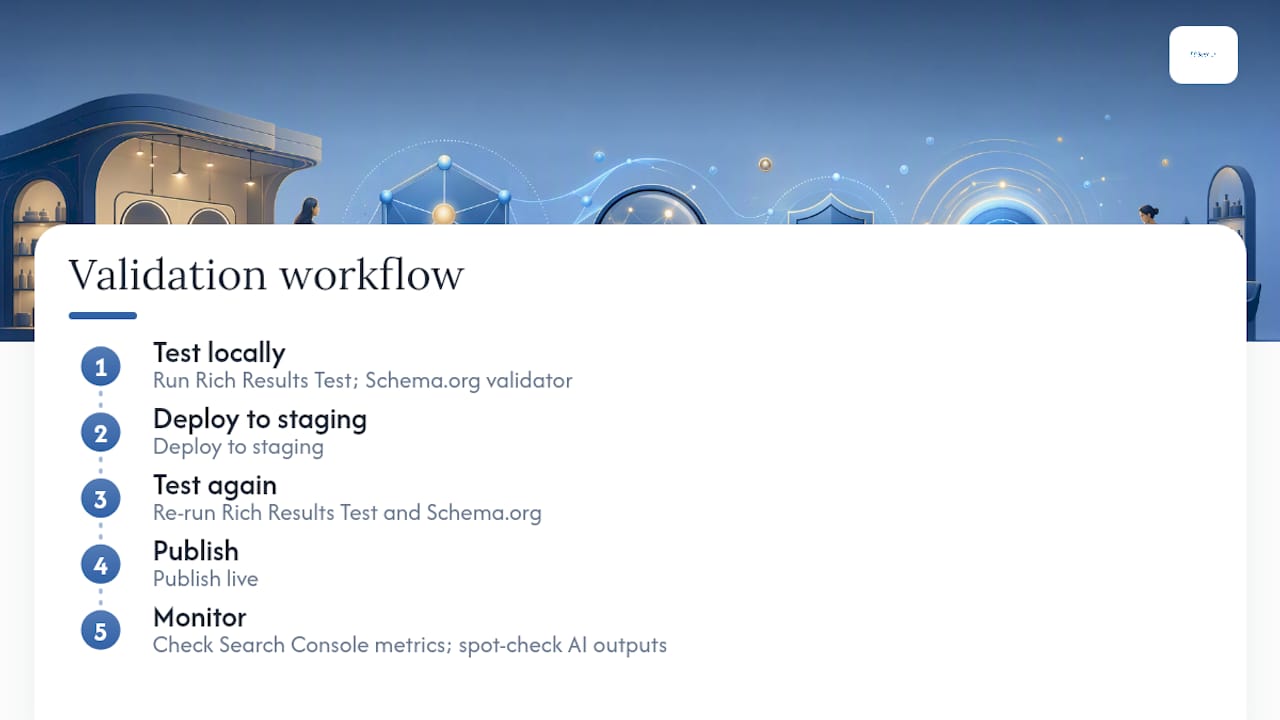
Test before you trust it. Run every page through the Rich Results Test first, then cross-check with the Schema.org validator for syntax issues Google’s tool might not flag. The workflow that avoids surprises: test locally, deploy to staging, test again, publish, then watch Search Console’s Enhancements reports for parsing errors.
Three errors show up more than any others: a required field missing (usually address or offers), a type mismatch (a Service accidentally typed as a generic Thing), and an invalid sameAs URL that redirects or 404s. Fix required-field errors first since they can block rich result eligibility outright.
Watch two signals after publishing: rich result impressions and clicks in Search Console, and manual spot-checks of how AI tools summarize your services when you search your own treatments by name. Per-staff schema paired with FAQPage markup tends to surface faster in AI answers than waiting on Google Business Profile changes alone. Re-run tests any time you update prices, add a service, or change staff.
Mistakes That Quietly Break Your Schema
The most common failure is markup that describes something the page doesn’t actually show, a mismatch between visible content and structured data that search engines increasingly penalize rather than ignore. Right behind that: accidentally applying a MedicalClinic type to a salon page (usually from a copied template built for a different industry), duplicate @id values across pages, and ReserveAction links that point to a booking page that no longer exists.
Run these checks before anything goes live:
- Every field in the schema matches something a visitor can actually see on the page.
- Dates and durations use valid ISO formatting, not a casual string like “45 mins.”
- Booking links resolve directly, without bouncing through a broken redirect.
- Staff
sameAslinks point to real, verifiable credential pages, not a generic social profile.
Pro Tip: If a claim in your schema would embarrass you on a call with a client, don’t publish it. Overstated credentials or hidden claims inside markup that don’t match the page are the fastest way to lose trust with both search engines and patients.
One-line pre-publish rule worth pinning above your desk: if it’s not visible, verified, and valid, it doesn’t go in the schema.
Why This Actually Moves the Needle for Clinic SEO
Structured data alone doesn’t fix a weak website, but paired with real service pages and a maintained Google Business Profile, it changes what search engines and AI tools can confidently say about you. One salon case study tied a structured data rollout to a 60% jump in organic discovery alongside a modest booking lift, evidence that this pays off fastest when it’s part of a broader content push, not a standalone fix.
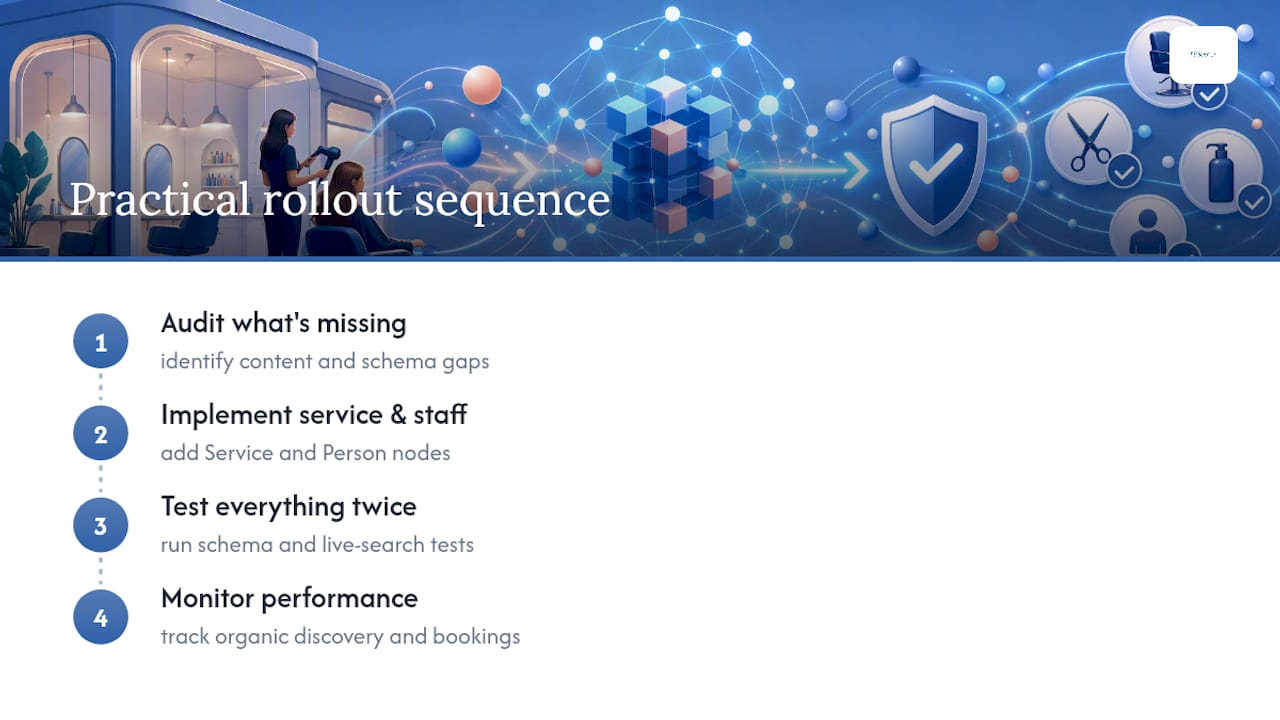
The practical sequence is always the same: audit what’s missing, implement service and staff nodes, test everything twice, then monitor. If your site has more than a handful of services or providers, that’s usually the point where handing implementation to someone who does this daily saves more time than it costs. Growth Reach Marketing’s guide on salon schema markup and its companion piece on internal linking for clinic SEO go deeper on both fronts, and the clinic playbook for presenting credentials responsibly is worth reading before you write a single hasCredential field.
— Gerard
Let Growth Reach Marketing Handle the Technical Lift
An agency can be an alternative to hiring a freelance developer piecemeal for schema markup for clinics. Instead of paying per fix every time you add a service or a new hire, you get an audit, full JSON-LD implementation, Search Console monitoring, and Google Business Profile alignment handled as one connected system.
This fits best for multi-provider clinics juggling several treatment menus, med-adjacent practices trying to stay compliant with credential claims, and owners who simply don’t have a developer on call. Structured data alone won’t fill a booking calendar, but paired with a genuine local SEO strategy, it gives search engines and AI tools a much clearer reason to recommend you over the salon three streets over. If you’re ready to see where your current markup stands, get an audit started and find out exactly what’s missing before your next content update goes live.
Where to Verify These Standards Yourself
For the canonical property lists, check Schema.org’s own pages on BeautySalon and HealthAndBeautyBusiness, plus Google’s own BeautySalon mapping for how it’s actually consumed in search. For validation, use the Rich Results Test and Schema.org’s validator. For service and provider-level detail specific to aesthetic treatments, the med spa schema guide and this AI SEO framework for beauty salons cover ground this article draws on directly. For a broader look at how machine-readable data supports AI search generally, see this explainer on AI and SEO.
Sources
FAQ
Do I Need Both BeautySalon and HealthAndBeautyBusiness Schema?
No. Pick one primary type based on your service mix. Use BeautySalon for cosmetic-only businesses and HealthAndBeautyBusiness if you blend wellness and beauty services without medical licensure.
Can I Use MedicalClinic Schema for an Aesthetic Clinic?
Only if you’re a licensed medical facility. Applying MedicalClinic or Physician types to a salon or non-medical aesthetic business risks overstating your credentials and confusing search engines about what you actually offer.
How Long Does It Take to See Results From Clinic Schema Markup?
Rich result changes can appear within days of Search Console recrawling your pages, but meaningful visibility gains usually take a few weeks and depend on the rest of your site’s content quality.
What’s the Single Biggest Schema Mistake Salons Make?
Duplicate or missing @id values on Service and Person nodes, which confuses search engines about which entity owns which data. A close second is markup that describes something not actually visible on the page.
Should I Hire Someone to Implement This or Do It Myself?
A single-location salon with a handful of services can often implement this with a template and careful testing. Multi-provider clinics or businesses without in-house developer time typically get it done faster and more accurately working with an experienced agency.