
Negative keywords are search terms you tell Google Ads never to show your ads for. For a clinic, they are the quickest way to stop paying for clicks from people who were never going to book: job hunters, bargain hunters, students researching a procedure, and people searching in a town you do not serve. This guide shows you how to find those terms, which to exclude, which to keep, and how to avoid blocking the enquiries you actually want.
TL;DR
- Negative keywords stop your ads appearing for searches you list, so your budget goes to people who are closer to booking.
- Start with the Search terms report in Google Ads. Real searches that triggered your ads are the best source of exclusions.
- Match type matters. A careless broad negative can block good enquiries, and negatives do not catch plurals or close variants automatically.
- Review the report on a schedule. A list is a living document, not a one-off task.
- Keep terms that signal a treatment or a local client, even if they look vague, until the data tells you otherwise.
Table of Contents
- What negative keywords do for a clinic’s ads
- Step 1: Find irrelevant searches in the Search terms report
- Step 2: Decide what to exclude and what to keep
- Step 3: Choose the right match type
- Step 4: Add negatives at the right level
- Step 5: Review on a schedule
- Common mistakes that block real enquiries
- A worked example
- Where our approach comes in
- Perspective
- FAQ
- Sources
What negative keywords do for a clinic’s ads
In Google Ads you choose keywords you want to trigger your ads. Negative keywords work the other way round. According to Google’s own guidance on negative keywords, they let you exclude search terms from campaigns so you can focus on the keywords that matter to your customers, which puts your ads in front of interested users and can improve return on investment.
For an aesthetic clinic or med spa, the problem is easy to see. A search such as “botox” can come from someone ready to book a consultation in Cork. It can also come from someone reading about side effects, someone looking for training courses, or someone searching for a wholesale supplier. All of them can trigger the same ad if you let them, and every click costs you money.
Salons have the same issue. A hair colour campaign can attract people looking for a DIY box dye, a college course or a vacancy at a competitor. None of these are bookings.
Negative keywords do not make your ads better on their own. They narrow the audience so that the ads you already wrote are seen by a more relevant crowd. That is also why they connect closely to ad relevance in Google Ads: the closer the search matches your offer, the easier it is for the whole account to perform.
Step 1: Find irrelevant searches in the Search terms report
Do not start by guessing. Start by looking at what people actually typed.
Google’s help page on getting negative keyword ideas from the search terms report describes the method: look at the real searches that triggered your ads, then pick terms that are related to, but not exactly what, you sell. Those become your negatives.
Here is the route through the interface, as Google describes it:
- Open your campaigns in Google Ads.
- Go to Insights and reports, then Search terms.
- Tick the queries that are clearly irrelevant.
- Click Add as negative keyword.
- Choose where to add them: an ad group, a campaign, an existing negative keyword list or a new list.
When you scan the report, sort by cost rather than by impressions. A term with 3 clicks and no enquiries at a high cost per click deserves more attention than a term with 200 impressions and no clicks.
If the account is new and has little data, you can also brainstorm. Type your treatments into Google and note the autocomplete suggestions and related searches. Think about the places you actually serve. A clinic in Dublin 2 faces different search patterns from a salon in Letterkenny, so research the towns and counties in your catchment, not just the country as a whole.
Step 2: Decide what to exclude and what to keep
This is the part most guides skip. Not every vague term is waste. The test is simple: could the person behind this search plausibly book with us?
The lists below are starting points based on common patterns in clinic accounts. They are judgement calls, not rules, and you should check each against your own search terms report before adding it.
Groups that are usually safe to exclude
| Group | Example terms | Why they rarely convert |
|---|---|---|
| Jobs and training | jobs, careers, vacancies, course, training, apprenticeship, salary | The searcher wants work or a qualification, not a treatment |
| Free and bargain seekers | free, cheap, discount code, voucher, giveaway | Often price-only intent that does not fit a premium clinic |
| DIY and home use | at home, DIY, kit, home device, homemade | They want to do it themselves |
| Suppliers and trade | wholesale, supplier, buy online, distributor, for sale | A business buyer, not a client |
| Pure research | pictures, memes, history of, wikipedia | Information intent with no booking in sight |
| Wrong places | towns or countries you do not serve | Cannot visit you |
| Wrong services | treatments you do not offer | Mismatch between ad and clinic |
Your own mix will differ. A clinic that sells a skincare range online might happily keep “buy”, while a purely appointment-based clinic may exclude it.
Groups to be careful with
Some terms look unhelpful but can hide a lead:
- “Cost” and “price”. People searching for the price of a treatment are often comparing clinics and close to deciding. Excluding these usually costs you enquiries.
- “Before and after”. Many people look at results shortly before booking a consultation.
- “Near me” and town names. These are local-intent terms. Keep them, and exclude only places outside your area.
- “Side effects” and “risks”. This one is tricky. It can be anxious research, but it can also be a careful client who wants a trustworthy clinic. Watch the data before deciding, and make sure your landing page answers safety questions honestly.
- Brand names of devices or products you use. Keep these if you offer that treatment. Exclude them if you do not.
- Cheaper alternatives you also offer. If you sell both a premium and an entry treatment, a term that looks low-end may still suit you.
The principle is to exclude by intent, not by a single scary word. If a query could belong to a booking client even 1 time in 10, test it in a narrower match type before blocking it.
Examples by clinic type
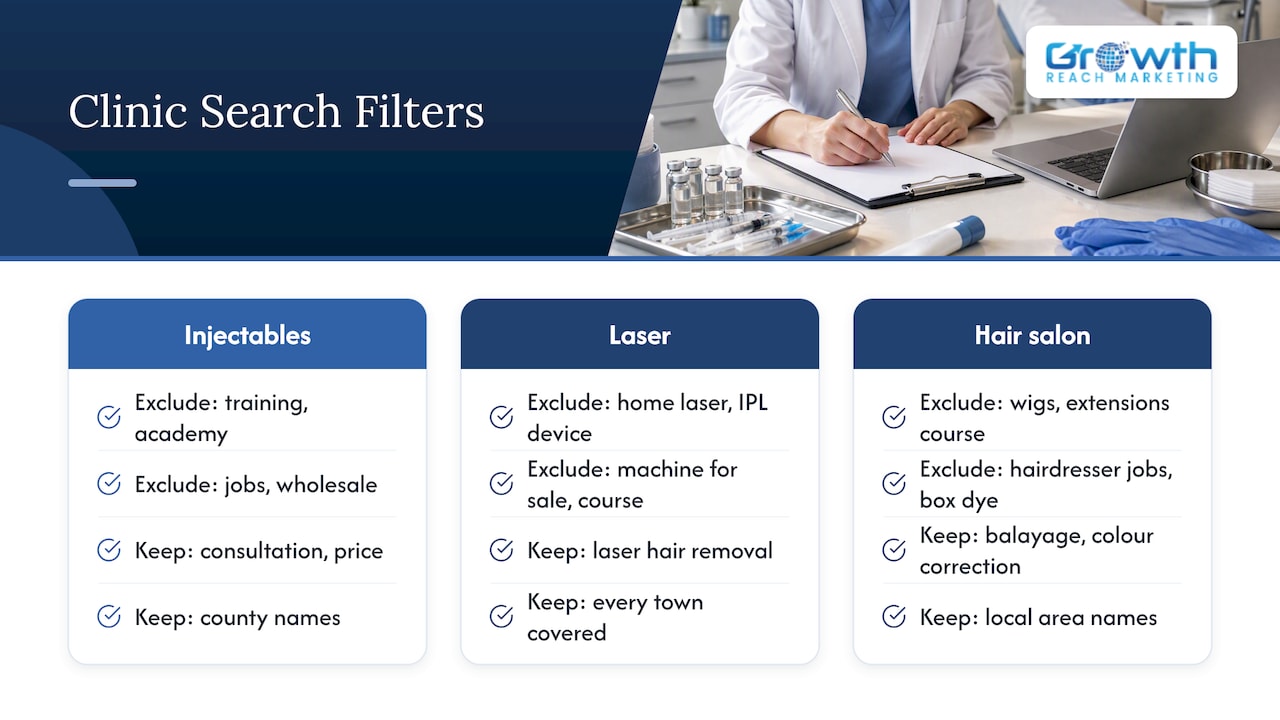
An injectables clinic might exclude “training”, “academy”, “jobs” and “wholesale”, while keeping “consultation”, “price” and its county names.
A laser hair removal clinic might exclude “home laser”, “IPL device”, “machine for sale” and “course”, while keeping “laser hair removal” plus every town it covers.
A hair salon might exclude “wigs”, “extensions course”, “hairdresser jobs” and “box dye”, while keeping “balayage”, “colour correction” and local area names.
For a deeper look at how this plays out in the sector, our page on negative keywords for med spa ad waste walks through a clinic-focused approach.
Step 3: Choose the right match type
A negative keyword can block too little or too much depending on its match type. Google’s negative keyword documentation explains the three behaviors:
| Match type | How it behaves | Typical use |
|---|---|---|
| Broad match negative | Blocks searches that contain all of your negative terms, in any order, possibly with other words | Safe for single words that are never relevant, such as “jobs” |
| Phrase match negative | Blocks searches where your terms appear together in the same order. Adding characters to a word can let the ad show | Multi-word phrases such as “laser hair removal course” |
| Exact match negative | Blocks only that exact search, in that order, with no extra words | Precise blocks when a similar phrase could be a real client |
Google also notes that in Search campaigns you pick the match type using symbols, as covered in its page on adding negative keywords to campaigns. Broad is the default and has no symbol, phrase match uses quotation marks, and exact match uses square brackets. The same page notes that for Display and Video campaigns, negatives are treated as broad match.
Close variants are not covered
This catches out many advertisers. Negative keywords do not match close variants such as plurals, according to Google. If you exclude “course” and you also want to stop “courses”, add both. Google does say misspellings are accounted for automatically, so you do not need to list every typo.
The same page also notes that periods in negative keywords are ignored, and that operators such as “OR” or a leading minus sign are ignored for negative keyword matching. Write your list as plain terms, one per line.
Watch for overlap
Google warns that negative keywords that overlap with your regular keywords can stop your ads from showing at all. Imagine you bid on “laser hair removal cost” and add the broad negative “cost”. The negative wins and the ad goes quiet. Before you save a batch, compare it against your active keywords.
Step 4: Add negatives at the right level
Where you put a negative decides how far it reaches. Google supports several levels, set out on its page about adding negative keywords to campaigns:
- Ad group level. Use this to keep one treatment’s ads away from another’s searches. For example, stop your lip filler ad group from showing for “anti-wrinkle” searches that belong in a separate group.
- Campaign level. Select the campaign, add one negative per line, choose the match type and click Done. Good for exclusions that apply to a whole service line.
- Shared lists. Create one list, such as “jobs and training”, and apply it to several campaigns. Google allows up to 5,000 keywords per list and up to 20 lists per account.
- Account level. Negatives here apply automatically across eligible Search and Shopping inventory. Google sets a limit of 1,000 account-level negative keywords.
A sensible structure for a clinic with several treatments:
- Put universal exclusions (jobs, courses, free, DIY, wholesale) in a shared list or at account level.
- Put place-based exclusions at campaign level, matched to the area each campaign targets.
- Use ad group negatives to separate treatments from each other so each ad meets the right searcher.
Keep a simple note of why each major exclusion was added. When someone reviews the account six months later, that note avoids accidental reversals.
Step 5: Review on a schedule
Negative keyword work is never finished. New searches appear, your treatment menu changes, and seasonal promotions bring new terms.
A practical rhythm:
- First month of a campaign: check the Search terms report every week. Early data has the most waste.
- After that: review at least monthly. Add clear exclusions, and look for terms that are bringing enquiries that you had not expected.
- After launching a new treatment or promotion: review again within a week or two, because new ad copy attracts new queries.
- Every few months: audit the lists for overblocking. If impressions or enquiries drop with no other change, an old negative could be the cause.
Google recommends choosing a match type that will not block relevant searches and checking close variants, since they are not matched automatically. That review step is where good accounts separate from average ones. Reading search terms and deciding what to cut is routine work, and that is exactly why it gets skipped.
Tie the review to outcomes, not only clicks. A term that costs money but regularly produces booked consultations is not waste. If your tracking only counts form fills, you may cut terms that lead to calls or messages instead. Our pieces on why aesthetic clinics lose paid ad spend and tracking bookings rather than forms cover how to set up that measurement properly.
Common mistakes that block real enquiries
Too many negatives. Google notes that using too many negative keywords can restrict your reach. A list of 800 terms written in a hurry may be doing more harm than a list of 80 chosen carefully.
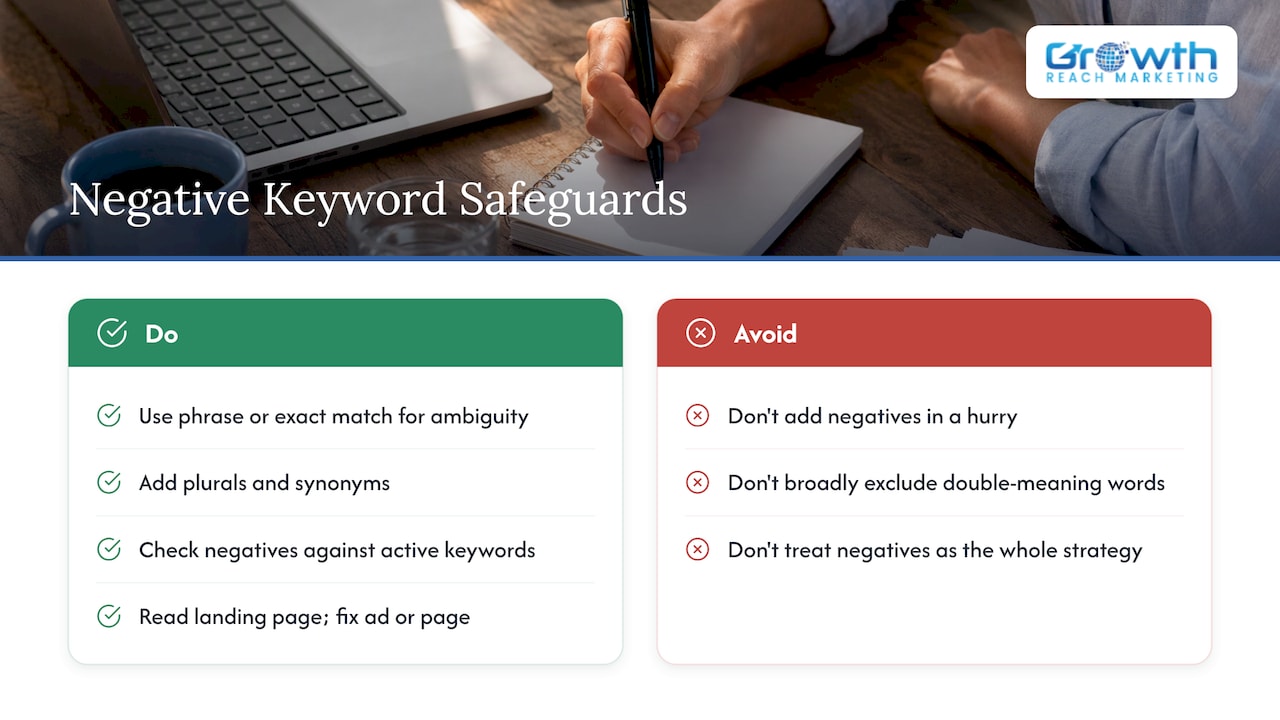
Broad negatives for words with double meanings. “Training” is a clear exclusion for a clinic. “Free” might remove a legitimate “free consultation” search. Use phrase or exact match when a word has several meanings.
Forgetting plurals and synonyms. Add “job” and “jobs”, “course” and “courses”, and similar pairs.
Blocking your own keywords. Check any new negative against your active keyword list.
Adding negatives without reading the landing page. Sometimes irrelevant clicks come from an ad that promises the wrong thing. Fix the ad or page, not only the list.
Treating negatives as the whole strategy. They trim waste. They do not replace good keyword structure, clear offers and a booking page that converts. For the wider picture, see our Google Ads guide for medical aesthetics and our work on booking conversion optimization.
A worked example
Imagine a small Irish aesthetic clinic running one Search campaign for anti-wrinkle treatments. After three weeks, the owner opens the Search terms report and sorts by cost. She spots these queries, using made-up figures to show the process:
- “anti wrinkle injections training course” with several clicks and no enquiries
- “anti wrinkle jobs” with a handful of clicks
- “anti wrinkle cream” with plenty of clicks
- “anti wrinkle injections price” with fewer clicks but two enquiries
- “anti wrinkle injections in a town 150 km away” with a couple of clicks
Her decisions:
- Add “training”, “course” and “courses” as phrase or broad negatives in a shared list, plus “jobs” and “job”.
- Add “cream” and “creams” as negatives, because her clinic sells treatments rather than skincare.
- Keep “price”. It is producing enquiries.
- Add the far-away town as a negative in this campaign, or better, narrow the location targeting.
- Note the date and reason in a simple log, and set a reminder to check again in a month.
Nothing here is complicated. The value comes from doing it consistently and judging each term by its likely buyer.
Where our approach comes in
If you manage Google Ads yourself, the steps above are enough to make a real difference within a few weeks. If you do not have the time to review search terms every week, or you want the account structured so negatives are built in from day one, that is something we handle for salons, aesthetic clinics and med spas. Our services page lists what we offer, including Google Ads-related lead generation and conversion optimization, and you can see how we think about it in our beauty clinic lead generation playbook.
We are an Ireland-based agency and we work with owners directly. If you would like us to look at your search terms and tell you what is leaking budget, start from our homepage and get in touch.
Perspective
Most clinic owners we speak to are not short of ideas for ads. They are short of time to look at what those ads actually triggered. The Search terms report is rarely opened, and so the same irrelevant searches keep costing money month after month.
We build negative keyword reviews into the routine, not into a one-off clean-up. Our view is that a tailored system for beauty and aesthetics works better than a generic template, because a salon in a small town and a med spa in Dublin attract completely different searches. That is why we work closely with each client and rely on data rather than assumptions.
We also care about not overcorrecting. A cleaner account is not the goal. More booked appointments from the same budget is. If a term looks messy but leads to consultations, we keep it.
Gerard
FAQ
How many negative keywords should a clinic add?
There is no ideal number. Google notes that too many negatives can restrict reach, so add terms that your own search data shows are irrelevant and avoid pasting in huge generic lists. Start with the clear groups such as jobs, training and DIY, then grow the list from your weekly or monthly review.
Will negative keywords lower my ad spend?
They can lower spend on clicks that were never going to convert, which lets the same budget reach more relevant searches. They do not guarantee a lower total bill, because Google may spend the saved money on other relevant searches. The aim is a better cost per booked enquiry, not just a smaller invoice.
Should I use broad, phrase or exact match for negatives?
Use broad for single words that are never relevant to your clinic, phrase for multi-word phrases in a fixed order, and exact when a similar search could still be a real client. Remember that negatives do not cover plurals or close variants, so add those versions separately.
Where do I add negative keywords in Google Ads?
You can add them at ad group, campaign, shared list or account level. The quickest way is from the Search terms report: select the irrelevant queries and click Add as negative keyword, then choose where they should go. Google lists the steps on its help pages.
How often should I check my search terms?
Weekly in the first month of a campaign, then at least monthly. Check again after launching a new treatment or promotion, since new ad copy attracts new searches.
Sources
- About negative keywords – Google Ads Help
- Add negative keywords to campaigns – Google Ads Help
- Get negative keyword ideas using the search terms report – Google Ads Help