
Negative keywords stop irrelevant searches from wasting your Google Ads budget: add them now to cut wasted clicks and lift qualified traffic. A negative keyword tells Google not to show your ad for a specific search. This means fewer clicks from people looking for training courses, jobs, or DIY tips instead of an appointment. Start by opening your search terms report today and flagging the queries that don’t belong.
TL;DR:
- Negative keywords do not automatically match close variants, plurals, or synonyms, requiring med spas to include multiple forms for comprehensive blocking.
- Most irrelevant traffic comes from training, self-treatment, job seekers, discount hunters, and out-of-area searches, which should be targeted with specific negatives.
- Regularly reviewing search terms reports every two weeks helps identify new irrelevant queries and prevents budget waste from unblocked unwanted searches.
- Over-broad negatives like “training” can conflict with legitimate patient searches, so cross-check negatives against active keywords before application.
- Building shared negative keyword lists and staging their rollout minimizes risk and maintains consistent, effective exclusion of unwanted search intent.
Table of Contents
- How negative match types differ from positive keywords
- Why negative keywords matter for your ad performance
- Negative keyword categories every med spa should block
- Building and maintaining your negative keyword list
- Avoiding over-blocking and negative keyword conflicts
- A starter negative keyword list you can deploy today
- How an agency audit finds and fixes wasted spend
- A final checklist for med spa Google Ads accounts
- Let Growth Reach Marketing handle the cleanup for you
- Where to verify this and dig deeper
- Sources
- FAQ
How negative match types differ from positive keywords
Negative keywords work opposite to positive ones. A positive keyword tells Google when to show your ad; a negative keyword tells Google when to hold it back. Both use match types, but the effect flips.
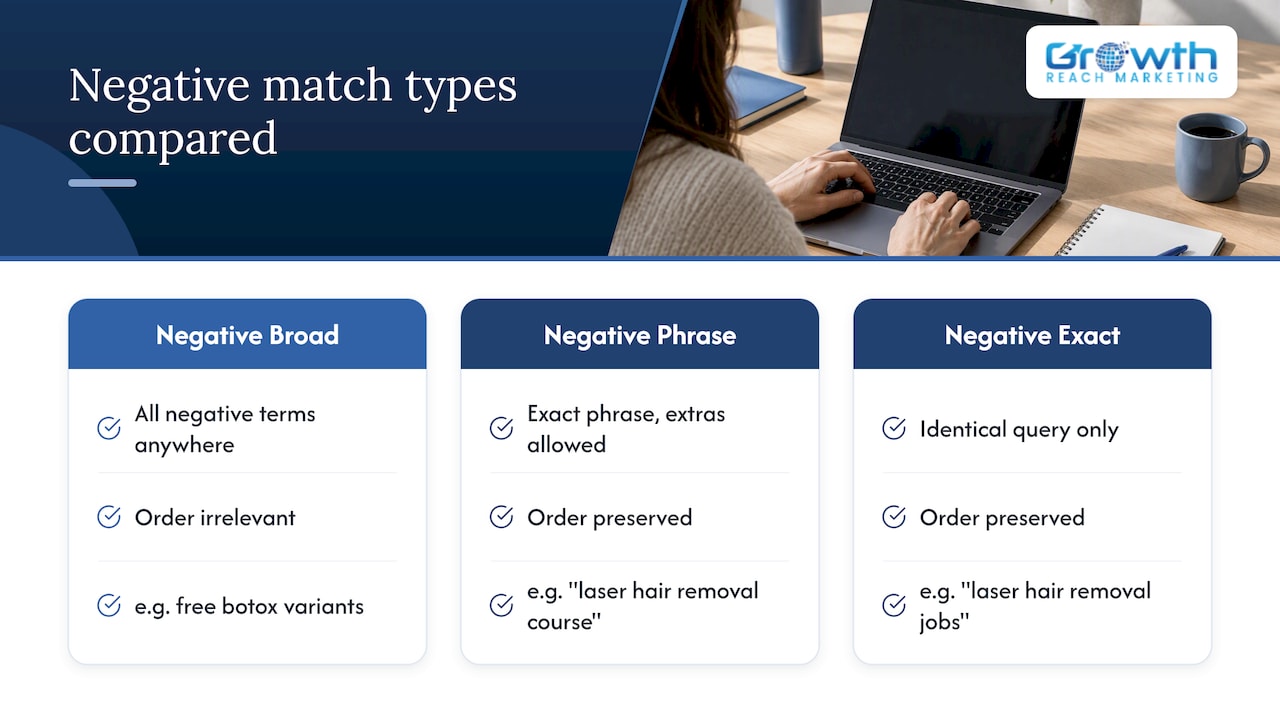
Negative broad match blocks any search containing all your negative terms in any order, so a negative broad match on “free botox” also blocks “botox for free consultation.” Negative phrase match blocks searches containing that exact phrase in order, allowing extra words before or after it. Negative exact match only blocks the identical search query, nothing more, nothing less.
One detail catches almost every med spa owner off guard: according to Google Ads Help, negative keywords do not automatically match close variants, plurals, or synonyms the way positive keywords do. If you add “injection” as a negative, it will not automatically block “injections.” You have to add both forms, along with related synonyms like “shots” or “filler jobs,” to get full coverage.
A practical example: a med spa selling laser hair removal might add “laser hair removal course” as a negative phrase to block training searches, while separately adding “laser hair removal jobs” and “laser hair removal careers” as negative exact matches to stop job seekers without accidentally excluding someone searching “laser hair removal course of treatment,” which could be a real patient question.
Why negative keywords matter for your ad performance
Every irrelevant click still costs money, and aesthetics keywords are expensive enough that a handful of bad clicks a day adds up fast. Negative keywords remove that leak, which shows up directly in your click-through rate, conversion rate, and cost per conversion.
Wasted spend in med spa advertising typically comes from a predictable set of sources: people researching how to perform a treatment themselves, aspiring estheticians looking for training, job seekers, bargain hunters chasing free consultations, and searchers outside your service area.
Negative keywords do not automatically match close variants, plurals, or synonyms, according to Google Ads Help, which means a list built once and never revisited slowly loses effectiveness as new irrelevant search patterns appear.
After applying a new batch of negatives, watch your search terms report for two things: a drop in impressions from irrelevant queries and a corresponding rise in conversion rate among the traffic that remains. If conversions drop too, a negative may be blocking a query with real patient intent.
Negative keyword categories every med spa should block
Most wasted clicks for med spas fall into a handful of predictable buckets. Building your list around these categories covers the bulk of irrelevant traffic before you ever look at your own search terms report.
- Training and education: “botox training,” “microneedling course,” “esthetician certification,” “how to become a laser technician”
- DIY and self-treatment: “how to do microneedling at home,” “DIY chemical peel,” “at home laser hair removal,” “self filler injection”
- Jobs and careers: “med spa jobs near me,” “esthetician hiring,” “botox injector jobs,” “medical spa careers”
- Discount and free seekers: “free botox consultation,” “cheap filler,” “botox coupon,” “groupon med spa”
- Supplier and wholesale queries: “buy botox wholesale,” “filler supplier,” “dermal filler distributor”
- Out-of-area searches: add city or region names outside your service radius once you spot them in the report
An industry-curated reference such as the med spa negative keyword list from Keyword Ninja collects many of these terms in one place, though it’s meant as a starting template rather than a finished list for every account.
Exceptions matter here. A med spa that actively runs seasonal deals shouldn’t blanket-block every discount term, and a clinic that also trains injectors as a side business needs training terms carved out of the negative list rather than blocked outright. Watch for overlap too: “botox course” as a negative phrase could unintentionally catch “botox course of treatment,” a legitimate patient query.
Pro Tip: Search your own service pages for the exact words you’re about to block; if a real offering uses that phrase, switch the negative to exact match instead of phrase or broad.
Building and maintaining your negative keyword list
Getting negatives into your account correctly takes a specific sequence, not just a list pasted into a settings page.
- Pull your search terms report and sort by spend to find the queries burning budget without converting.
- Flag irrelevant terms and add them as negatives directly from the report; by default, negatives added this way use negative exact match, according to Google Ads Help.
- Group recurring categories (training, jobs, DIY) into a shared negative keyword list rather than adding them one campaign at a time.
- Apply that shared list at the account or campaign level, and reuse it across client accounts if you manage a manager account, since Google Ads Help confirms shared lists in a manager account speed up rollouts and keep exclusions consistent.
- For Display or Video campaigns, treat negatives differently: Google Ads Help notes that display and video negative keywords act more like broad topic exclusions and are less precise than on Search, so content exclusions work better there.
A few habits keep the list clean over time:
- Review the search terms report every two weeks rather than letting months pass between checks.
- Log every negative you add, including the date and campaign, so you can trace performance changes back to a specific edit.
- Test new broad negatives in a single low-traffic campaign first before rolling them out account-wide.
Staging changes this way, as Google Ads Help recommends, limits the damage if a negative turns out to block more than intended.
Avoiding over-blocking and negative keyword conflicts
The most common failure mode isn’t forgetting to add negatives, it’s adding ones that fight your active keywords. A broad negative like “training” can silently cancel out a positive keyword like “botox training for patients considering treatment,” and you won’t always notice until conversions drop.
- Cross-check every new negative against your active keyword list before applying it account-wide.
- Run a filtered search terms report for any negative candidate to see if it overlaps with a converting query.
- Watch for broad-match negatives added in bulk from generic lists without a manual review pass first.
Practitioners frequently add broad-match negatives that conflict with target keywords, which stops ads from showing for otherwise valid searches, a pattern flagged in analysis of negative keyword match types.
If you suspect over-blocking, the recovery sequence is straightforward: remove the suspect negative temporarily, monitor impressions and conversions for a few days, then re-add it as a narrower exact match if the broad version was the problem.
Pro Tip: When in doubt, add a negative as exact match first; you can always widen it to phrase or broad later once you’ve confirmed it isn’t catching real patients.
A starter negative keyword list you can deploy today
A compact, high-value starter list covers most of the wasted spend a new med spa account accumulates before anyone touches the search terms report.
- “training,” “certification,” “course,” “how to become” (education and career searches)
- “how to do it yourself,” “at home,” “DIY” (self-treatment searches)
- “jobs,” “hiring,” “careers,” “salary” (employment searches)
- “free,” “cheap,” “coupon,” “groupon” (deal-seeker searches, unless you actively run promotions through those channels)
- “wholesale,” “supplier,” “distributor,” “bulk” (supply-chain searches unrelated to patients)
Three rules keep this list safe as you adapt it:
- Check active keywords first. Never add a term from this list without confirming it doesn’t overlap with a phrase your positive keywords already target.
- Respect service-versus-training overlap. If you offer training as a service line, pull those terms out entirely rather than trying to carve exceptions into a broad match.
- Stage large additions. Add the list to one campaign, watch it for a week, then roll it out account-wide instead of applying everything at once.
Label each addition with the date and source category in your change log, whether that’s a spreadsheet or notes inside your shared list, so you can trace any performance shift back to a specific change later.
How an agency audit finds and fixes wasted spend
A negative keyword audit starts with a full search terms report pull going back at least 30 days, cross-referenced against every active keyword to flag conflicts before anything gets added. Candidate negatives get grouped into categories, built into a shared list, and deployed in stages, starting with the lowest-traffic campaign to limit risk.
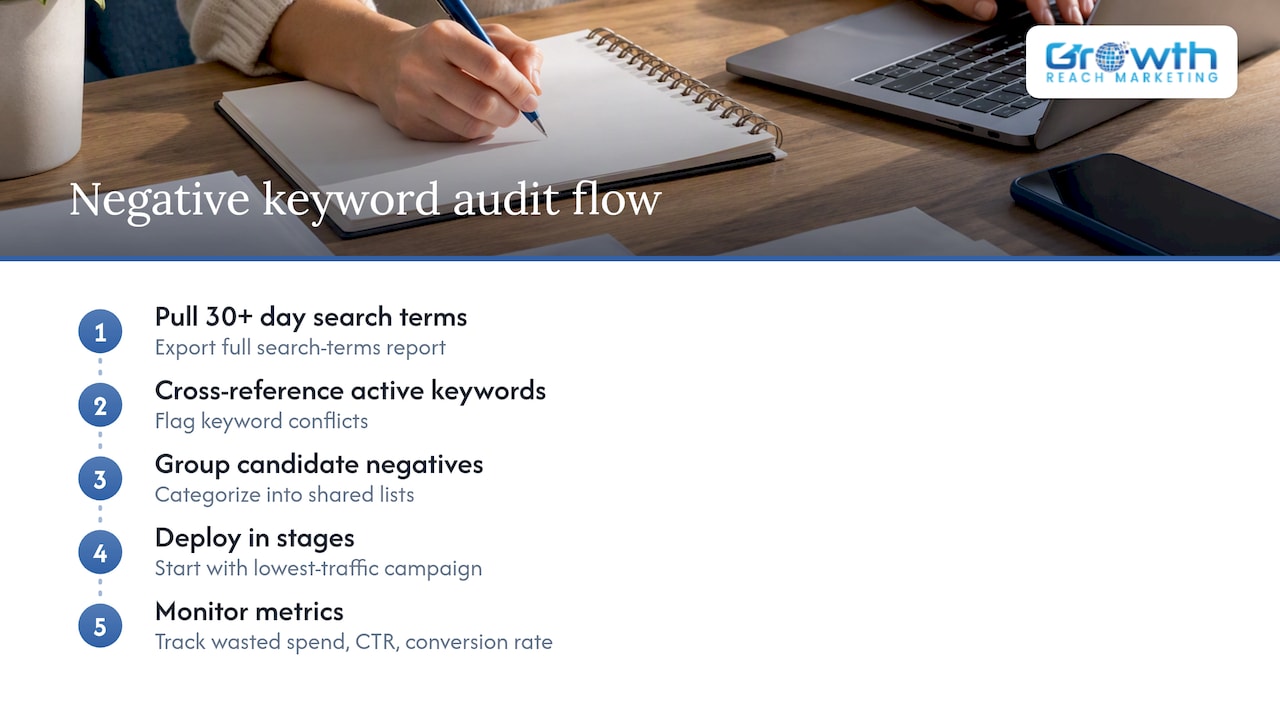
The metrics we track through that process are the same ones covered above: wasted spend as a share of total budget, click-through rate, and conversion rate, measured before and after each staged rollout. Most accounts show a measurable shift in the first two to four weeks once the initial cleanup lands, with ongoing review folded into regular account maintenance after that.
A final checklist for med spa Google Ads accounts
Pull your search terms report this week, add the starter categories above as exact match first, then schedule a recurring two-week review. Filter early, audit often: that single habit prevents more wasted spend than any one-time cleanup ever will.
— Gerard
Let Growth Reach Marketing handle the cleanup for you
Building and maintaining a negative keyword list takes ongoing attention that most med spa owners don’t have time to give between patients and payroll. Growth Reach Marketing runs Google Ads audits for aesthetics and beauty businesses that include search terms analysis, shared negative list setup, and staged rollout, paired with the same reporting rhythm covered above.
What that looks like in practice:
- A full search terms report review to catch existing wasted spend
- A shared negative list built for your account and applied in stages
- Ongoing monitoring so new irrelevant queries get caught before they burn budget
Our work sits alongside our broader Facebook & Instagram Ads Management, Social Media Management, and LinkedIn Management services for salons and clinics. If you’d rather have someone else run this cleanup and keep it current, reach out through our services page to talk through what an account audit would look like for your med spa.
Where to verify this and dig deeper
For the technical details behind match types, see Google Ads Help’s guide to negative keywords and its walkthrough on finding negatives from the search terms report. For a broader look at campaign structure once your negatives are cleaned up, our Google Ads guide for medical aesthetics clinics covers next steps. For cross-checking negatives against organic terms, this keyword discovery guide is a useful companion resource.
Sources
FAQ
What are examples of negative keywords?
Common examples for med spas include “training,” “jobs,” “DIY,” “free,” and “wholesale,” since these words tend to signal students, job seekers, bargain hunters, or suppliers rather than patients. A full starter list appears earlier in this guide, organized by category.
How do I make a negative keyword list?
Start by pulling your search terms report and flagging queries that triggered your ads without converting, then group repeat offenders into categories like training, jobs, or DIY. From there, build a shared negative list and apply it at the account or campaign level, following the steps in Google Ads Help.
What is a benefit of negative keywords?
Negative keywords cut wasted spend by preventing your ads from showing on irrelevant searches, which improves click-through rate and conversion rate for the budget that remains. Fewer irrelevant clicks means more of your budget goes toward searches with real patient intent.
Should negative keywords be exact match?
Not always. Negatives added directly from the search terms report default to exact match, according to Google Ads Help, which is the safest starting point since it only blocks the exact query. Phrase and broad match negatives offer wider coverage but carry more risk of blocking legitimate searches, so they work best after you’ve confirmed no overlap with active keywords.