Use these copy-paste ChatGPT prompts, plus one Salon Context Prompt, to write on-brand captions, emails, review replies, and booking messages in minutes instead of hours. Open ChatGPT, paste the Salon Context Prompt below, then work through the social, email, Google Business Profile, and retention prompts in this guide. Expect faster content production and more consistent rebooking messages once the setup is done right.
TL;DR:
- Use a detailed Salon Context Prompt to ensure ChatGPT’s output matches your specific salon’s brand, location, and target clientele.
- Automate social media, email campaigns, and review responses by connecting ChatGPT with marketing tools like Canva and Zapier, saving time and increasing consistency.
- Track your marketing performance through simple metrics such as bookings, email click-throughs, and social shares, adjusting strategies based on data-driven insights.
- Follow safety protocols by avoiding client-specific details in prompts, obtaining explicit consent for testimonials and images, and disclosing AI assistance transparently.
- Focus on building a repeatable, automated system rather than crafting perfect individual posts, as consistent rebooking messages drive more real growth than isolated content.
Table of Contents
- What Is the Salon Context Prompt in ChatGPT Salon Marketing?
- How Do You Write Salon Social Media Captions With ChatGPT?
- What Email Prompts Work Best for Salon Marketing?
- How Do You Use ChatGPT for Google Business Profile and Local SEO?
- What Are the Best ChatGPT Prompts for Client Retention?
- Can ChatGPT Write a Full Salon Marketing Strategy?
- Which AI Tools Should You Use to Run and Automate These Prompts?
- Perspective: What Growth Reach Marketing Recommends as Your First Test
- How Do You Customize ChatGPT Prompts for Your Salon’s Brand and Clients?
- How Do You Connect ChatGPT Prompts to Your Salon Software or CRM?
- How Do You Measure Whether Your ChatGPT Marketing Is Working?
- What Are the Legal and Privacy Risks of AI-Generated Salon Marketing?
- Why Does ChatGPT Sometimes Get Salon Marketing Wrong?
- How Much Does It Cost to Run ChatGPT for Salon Marketing?
- Perspective: Why Most Salon Owners Overcomplicate ChatGPT Marketing
- Get Help Turning These Prompts Into a Running Campaign
- Sources
What Is the Salon Context Prompt in ChatGPT Salon Marketing?
Before you write a single caption, ChatGPT needs to know your salon the way a new front-desk hire would on day one. Skip this step and every output sounds like it was written for a salon in a different city, with a different clientele, in a different price bracket. This is the single biggest reason salon owners try ChatGPT once, get generic copy, and give up.
Paste this into a fresh chat and fill in the brackets:
“You are the marketing voice for [Salon Name] in [City]. Our target client is [describe: age range, lifestyle, budget]. Our top three services are [Service 1], [Service 2], and [Service 3]. Our brand voice sounds like: [Phrase 1], [Phrase 2], [Phrase 3]. A typical visit flows: consultation, service, style, checkout with rebooking offer. From now on, write all copy in this voice unless I say otherwise.”
Five rules keep every output usable without a rewrite:
- Be specific about the service and result, not just “hair” or “nails.”
- Name the audience in every prompt (busy moms, brides, first-time clients).
- Feed ChatGPT two or three real phrases you’ve used before as voice samples.
- State the desired length (“under 40 words,” “three sentences max”).
- Read every output aloud before posting. If it sounds like a robot wrote it, it did.
Set the model to a moderate creativity level in ChatGPT’s settings if given the option, and treat the Salon Context Prompt as a system prompt you paste at the start of every new session, not something you retype daily.
How Do You Write Salon Social Media Captions With ChatGPT?
Social content is where most salon owners burn the most unpaid hours, and it’s also where ChatGPT earns its keep fastest. Generative AI tools are measurably changing how routine marketing tasks get done, and caption writing is about as routine as marketing tasks get.
Reel hook prompts (swap the bracketed variables for your service, result, and audience):
- “Write three 5-second Reel hooks for a [balayage] transformation aimed at [women 30-50 wanting low-maintenance color]. Make each hook a question or a bold claim.”
- “Write a Reel hook that opens with the client’s problem before showing the [service] result.”
- “Write a Reel hook using a common myth about [service] that we’re about to debunk on camera.”
Caption prompts:
- Short caption: “Write a 20-word Instagram caption for a [service] photo, upbeat tone, one emoji max.”
- Story caption: “Write a 60-word caption telling the story of a client who came in for [problem] and left with [result].”
- Testimonial caption: “Turn this client quote into an Instagram caption with a CTA to book: [paste quote].”
- CTA-focused caption: “Write a caption pushing weekend appointment availability with urgency but no discount.”
- Hashtag set: “Generate 15 relevant hashtags mixing local [city] tags and beauty niche tags for a [service] post.”
Sample output for the testimonial prompt: “She walked in stressed about grays. She walked out feeling like herself again. That’s the whole job. Book your color refresh, link in bio.”
Ask ChatGPT to build a full calendar in one prompt: “Create a 30-day social content calendar with columns for date, platform, post type, and a one-line caption idea, mixing Reels, carousels, and Stories, themed around [seasonal service push].”
| Day | Platform | Post Type | Caption Idea |
|---|---|---|---|
| 3 | Reel | Before/after of a curly cut transformation |
What Email Prompts Work Best for Salon Marketing?
Email still outperforms almost every other channel for the dollars you put into it. Industry reporting puts email marketing ROI around £36 to £42 for every £1 spent, which is exactly why a dormant client list is money left on the table.
Re-engagement sequence prompt: “Write a 3-email re-engagement sequence for clients who haven’t booked in 90 days. Email 1 is a check-in with a soft offer. Email 2 adds urgency. Email 3 is a last-chance message. Give me three subject line options per email.”
Appointment reminder prompt: “Write a friendly appointment reminder for email and SMS. Include the date, time, service, and a line about arriving 5 minutes early. Keep the SMS version under 160 characters.”
Seasonal promotion prompt: “Write a seasonal promotion email for [holiday/season] targeting [segment: new clients / VIP clients / lapsed clients]. Give me two subject lines to A/B test and a P.S. line pushing gift cards.”
Three things to check before sending anything ChatGPT produces:
- Does the offer match what your booking software can actually redeem?
- Is the subject line under 50 characters so it doesn’t truncate on mobile?
- Did you personalize the client’s first name and last service in the send, not just the prompt?
An email marketing prompt library built once and reused monthly saves more time than writing from scratch every campaign.
How Do You Use ChatGPT for Google Business Profile and Local SEO?
Your Google Business Profile is often the first thing a potential client sees before your website, and it directly feeds the official Business Profile tools that power local search results and booking links.
- Profile description prompt: “Write a 150 to 200 word Google Business Profile description for [Salon Name] in [City]. Include our top three services, our neighborhood, and one line about our booking process. Use natural local search phrasing without keyword stuffing.”
- Five-star review reply prompt: “Write a warm, specific reply to this 5-star review that thanks the client by name and mentions their service: [paste review].”
- Neutral or negative review reply prompt: “Write a calm, non-defensive reply to this review that acknowledges the concern, avoids blame, and invites the client to contact us directly to resolve it: [paste review].”
- FAQ generation prompt: “Write 8 short FAQ answers (under 40 words each) covering booking policy, pricing range, parking, and what to expect at a first visit.”
Consistent review responses and clear FAQ content are exactly what AI visibility research points to. Businesses with steady positioning, active reviews, and experience-based content are more likely to get recommended by AI search tools like ChatGPT and Google’s AI Overviews.
What Are the Best ChatGPT Prompts for Client Retention?
Rebooking is cheaper than winning a new client every time, and it’s also the easiest thing to automate once you have the right message templates.
- SMS rebooking prompt: “Write an SMS reminding a client it’s been [X weeks] since their last [service] and inviting them to book their next appointment. Keep it under 160 characters, warm but not pushy.”
- Post-appointment review request prompt: “Write a short, friendly text sent 24 hours after an appointment asking for a Google review, with a direct link placeholder.”
- Referral announcement prompt: “Write three versions of a referral program announcement: one for email, one for SMS, one for a social caption. Offer [referral incentive].”
- Automation workflow prompt: “Outline a message trigger schedule for a new client: welcome text at booking, reminder 24 hours before, review request 24 hours after, rebook nudge at 6 weeks.”
Treating these messages as an automated system rather than one-off tasks is what actually frees up owner time and keeps rebooking rates from sliding month over month.
Can ChatGPT Write a Full Salon Marketing Strategy?
Once the day-to-day prompts are running, ChatGPT can also draft the bigger picture. It won’t replace judgment, but it saves hours on the first draft.
- Campaign brief prompt: “Write three campaign briefs for [service push], each including goal, target audience, channels, and two high-level KPIs to track.”
- 90-day Instagram growth prompt: “Write a 90-day organic Instagram growth plan with three content pillars, a posting cadence, and two local collaboration ideas with [complementary local businesses].”
- Membership launch prompt: “Write a 6-month email roadmap for launching a monthly membership offering [service], including subject lines for each phase and one KPI to track per month.”
Hand any of these briefs to a staff member or a content marketing partner and they have enough structure to execute without guessing at direction.
Which AI Tools Should You Use to Run and Automate These Prompts?
ChatGPT handles the writing. For scale or a second opinion on tone, Google Gemini is worth trying side by side, since different models occasionally produce a sharper hook or a cleaner subject line.
- Pair every text prompt with a design prompt in Canva’s AI assistant to turn a caption into a finished graphic without opening a separate design tool.
- Feed finished ChatGPT copy into your booking software’s SMS tool or into Zapier to trigger sends automatically instead of copying and pasting into each platform by hand.
- Never paste a client’s full name, phone number, or health details into a prompt. Use placeholders like “[client]” and fill in personal details after the copy is generated.
Pro Tip: Keep a running doc of your five best-performing prompts and their outputs. Reusing a proven prompt beats reinventing one every week.
Perspective: What Growth Reach Marketing Recommends as Your First Test
Salons that treat ChatGPT like a junior copywriter, not a magic button, get the best results. Give it a brief, review the draft, tighten it, and the next brief gets easier because the model has your voice on file.
Run one 30-day test before rolling this out everywhere: a content calendar paired with an SMS rebooking automation. Track new client bookings, rebook rate, and email open and click rates for that single month. If rebook rate climbs even a few points, the system is working and worth scaling.
The Salon Context Prompt matters more than any single caption template here. Skip it, and every prompt after it drifts back toward generic. Build it once, save it, and iterate from real results instead of guessing what should work.
How Do You Customize ChatGPT Prompts for Your Salon’s Brand and Clients?
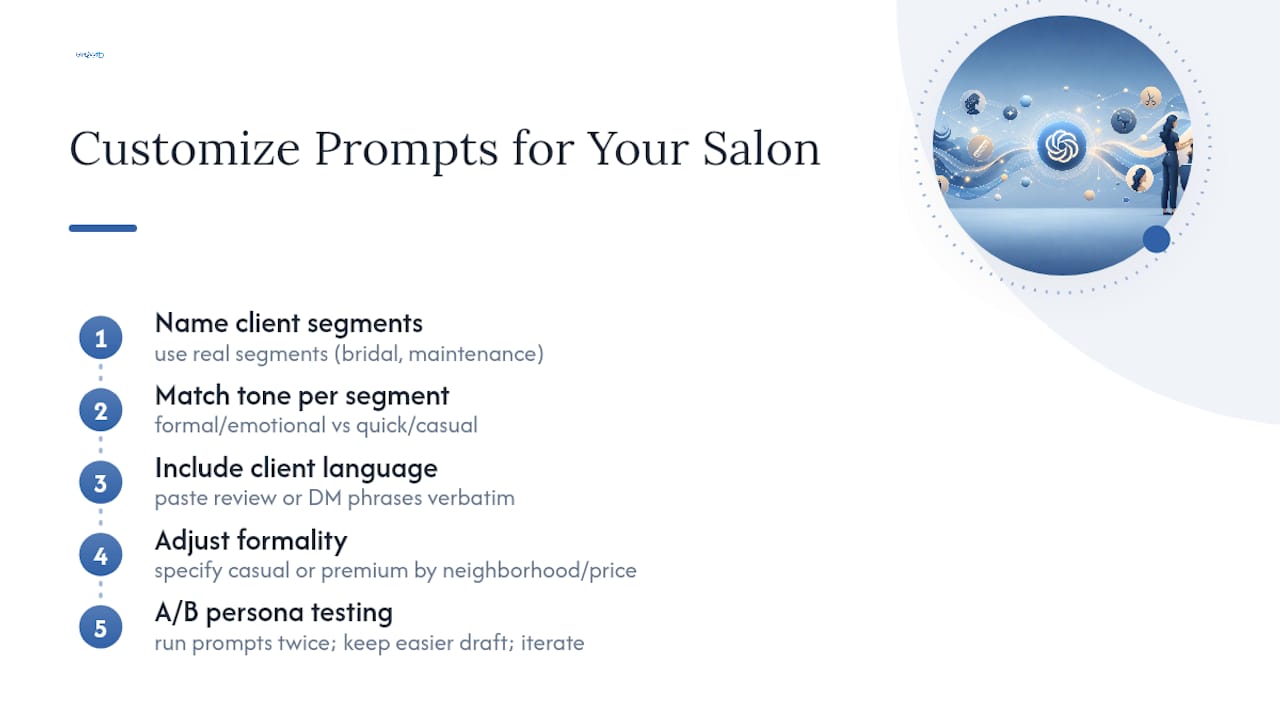
Generic prompts produce generic copy, and the fix is always the same: feed ChatGPT more specific detail about who you’re actually talking to. A salon serving busy professionals in their 40s needs different pacing and vocabulary than one built around Gen Z color trends.
Start by naming your actual client segments instead of writing to “our clients” as one group. If you serve both bridal clients and monthly color-maintenance regulars, those are two different prompts with two different tones. A bridal caption can lean formal and emotional. A maintenance client caption should sound quick, casual, and convenience-focused.
Feed ChatGPT direct examples of language your clients use themselves, pulled from reviews or DMs, not just how you’d describe your own brand. If clients keep saying “my hair finally feels healthy again,” that phrase belongs in your voice examples, not a stylized version you think sounds more professional.
Adjust formality by neighborhood and price point too. A high-end clinic-style salon and a walk-in-friendly neighborhood shop shouldn’t sound the same, even if they offer the same service. Tell ChatGPT explicitly: “write this at a more casual reading level” or “write this with a premium, editorial tone” and compare the two outputs side by side.
Run the same prompt through twice with different persona notes and keep whichever draft needs less editing. Over a few weeks, you’ll notice which voice cues consistently produce copy you can post with minimal changes, and that becomes your permanent Salon Context Prompt update.
How Do You Connect ChatGPT Prompts to Your Salon Software or CRM?
Getting ChatGPT copy out of a chat window and into an actual client’s inbox or phone requires a few connection points, but none of them require technical skill beyond basic setup.
Start with your booking platform’s built-in messaging tools. Most salon management systems allow custom SMS and email templates. Paste ChatGPT’s output directly into those template fields, keeping merge tags like client first name and last service intact so messages still feel personal.
For anything more automated, a tool like Zapier can connect a spreadsheet of pre-written ChatGPT messages to your CRM’s trigger events, so a rebooking text fires automatically six weeks after a visit without you touching it that week. Set this up once per workflow: welcome message, reminder, review request, rebook nudge.
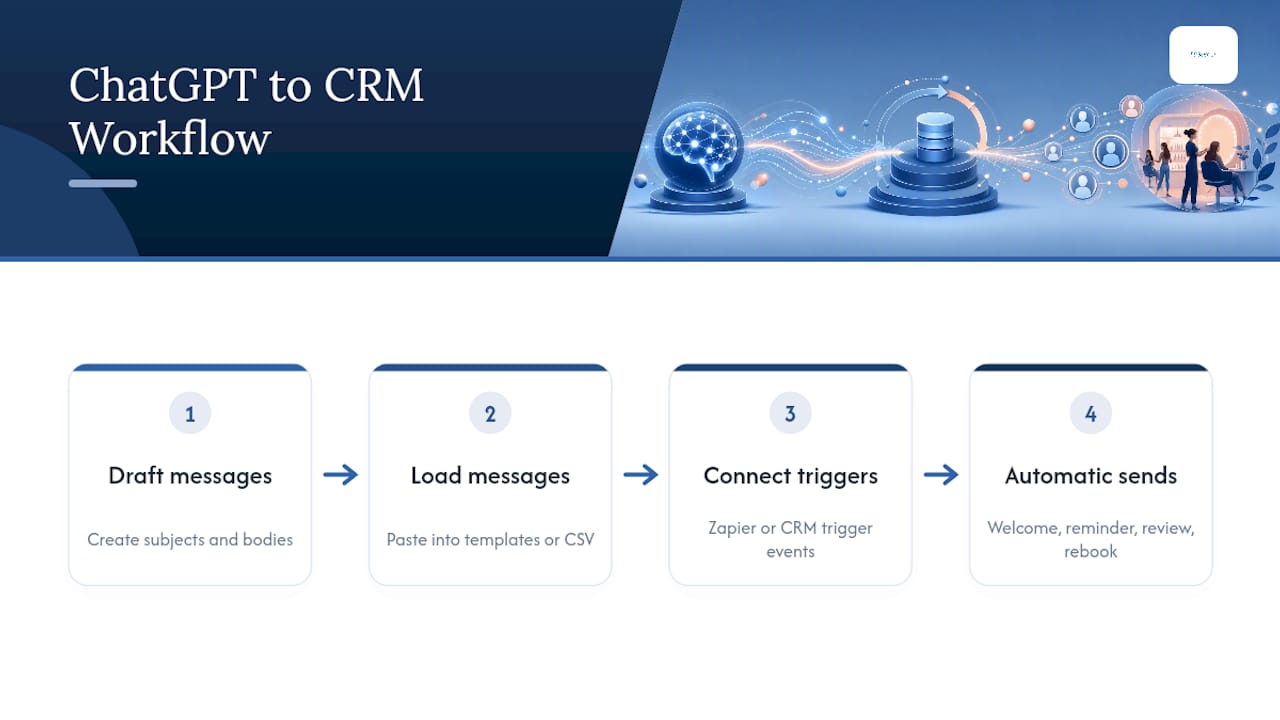
If your CRM supports CSV import for email campaigns, draft five to ten ChatGPT-generated subject lines and email bodies in one sitting, then load them into scheduled sends for the month ahead instead of writing one email at a time.
Test every automated message on your own phone and email before turning it live. A rebooking text that reads perfectly in ChatGPT can look broken once merge tags don’t populate correctly inside your actual software. Reviewing a workflow like this alongside a marketing automation guide or a partner resource on automating appointment reminders helps catch gaps before clients see them.
How Do You Measure Whether Your ChatGPT Marketing Is Working?
Copy that sounds good means nothing if it doesn’t move a number. Set up simple tracking before you launch anything, not after.
Ask ChatGPT to help build the tracking sheet itself: “Create a simple weekly tracking template with columns for campaign name, channel, sends, opens, clicks, and bookings attributed.” Drop this into a spreadsheet and update it every Monday in under five minutes.
For social content, track saves and shares over likes. A caption that gets saved is one a potential client plans to act on later, which matters more for booking intent than a quick double-tap. For email, watch click-through rate on the booking link specifically, not just opens, since opens can be inflated by subject line curiosity alone.
Use a monthly ChatGPT prompt to interpret the numbers: “Here are last month’s email and social metrics: [paste data]. Summarize what improved, what declined, and suggest two changes for next month.” This turns raw numbers into a short action list instead of a spreadsheet nobody revisits.
If you want visibility into whether AI tools like ChatGPT are actually surfacing your salon in their own recommendations, a tool such as Cairrot’s rank tracker gives a read on that separate but increasingly relevant metric.
What Are the Legal and Privacy Risks of AI-Generated Salon Marketing?
The biggest risk isn’t the copy itself. It’s what you paste into the prompt to get that copy written.
Never enter a client’s full name paired with health details, payment information, or anything from a private consultation into ChatGPT. Use generic placeholders like “[client]” or “[condition treated]” and personalize the final message after the AI-generated draft is done, outside the chat window.
Be careful with testimonials and before/after photos too. Get explicit client permission before using their words or images in AI-assisted content, and keep a simple written record of that consent. A before and after photo guide covers the consent and usage side of this in more depth.
Disclose AI involvement where it’s reasonable to do so, especially for anything resembling a testimonial or review reply. Clients generally don’t mind a salon using AI to draft a reminder text. They mind discovering a “personal” note wasn’t personal at all.
Finally, double-check every AI-generated claim about your services before it goes out. ChatGPT can write confidently about a treatment result or timeline that isn’t accurate for your salon specifically. You’re responsible for what gets published under your business name, regardless of what tool wrote the first draft.
Why Does ChatGPT Sometimes Get Salon Marketing Wrong?
ChatGPT is a strong first draft, not a finished campaign, and knowing where it tends to stumble saves you from publishing something off-brand.
The most common issue is generic language creeping back in after several messages in one chat session. The model can drift from your voice the longer a conversation runs. Fix this by restating your Salon Context Prompt every few sessions, or starting a fresh chat when output starts sounding flat.
Another frequent problem is factual overconfidence. ChatGPT might describe a service benefit or timeline that doesn’t match how your salon actually delivers that service. Always fact-check specifics like processing times, product names, and pricing before anything goes live.
Repetition across captions is common too, especially sentence openers like “Ready to…” or “Looking for…”. If you notice a pattern, ask directly: “Give me five options that don’t start with a question.”
Length control also slips occasionally. If you asked for “under 40 words” and got 70, say so directly: “That’s too long, cut it to under 40 words without losing the CTA.” ChatGPT responds well to blunt, specific correction, better than to vague requests to “make it better.”
How Much Does It Cost to Run ChatGPT for Salon Marketing?
The tool itself is close to free. Your time, and how you spend it, is the real cost to plan for.
ChatGPT’s free tier handles most of the prompts in this guide. A paid tier, if you choose one, typically runs a modest monthly fee and mainly buys faster response times and higher usage limits during busy periods, not fundamentally different output quality.
The real investment is setup time. Expect one to two hours to build your Salon Context Prompt, gather voice examples, and run a handful of test prompts until outputs feel usable without heavy editing. After that, a monthly content calendar and email sequence might take two to three hours instead of the six or eight hours it took writing from scratch.
Design tools like Canva’s AI assistant carry their own separate subscription cost if you go beyond the free tier, and automation platforms like Zapier often charge based on the number of workflow tasks running monthly. Budget for these as separate line items, not bundled into “the ChatGPT cost.”
If your time is genuinely the constraint, not the writing skill, that’s the point where handing the whole system to a lead generation partner or marketing team starts to make more financial sense than DIY prompting.
Perspective: Why Most Salon Owners Overcomplicate ChatGPT Marketing
Most advice on AI marketing treats every output as final copy, and that’s backwards. The real skill isn’t writing the perfect prompt. It’s editing fast and knowing your own voice well enough to spot when ChatGPT missed it.
Conventional wisdom says spend hours perfecting one master prompt. In practice, a rough Salon Context Prompt used consistently beats a perfect one you never finish writing. Start today with the basic version and refine it after you see real outputs against real client responses.
The bigger mistake salons make is using ChatGPT for one-off posts instead of building a repeatable system. A single great caption doesn’t move bookings. A rebooking sequence running quietly in the background every week does. Prioritize the retention prompts and the automation setup before you spend more time perfecting social captions nobody rebooks from.
Start small: one content calendar, one rebooking text sequence, thirty days, real numbers. Everything else in this guide builds on whether that first test actually moves your rebook rate.
— Gerard
Get Help Turning These Prompts Into a Running Campaign
Writing prompts is the easy part. Running them consistently across social, email, and Google Business Profile every single week, while tracking what’s actually converting, is where most salon owners lose steam by month two. Growth Reach Marketing builds and manages exactly this kind of system for salons, so the content calendar, rebooking automation, and review responses keep running without you touching them daily.
If you’re also trying to get found when clients ask AI tools directly for a recommendation, our Google AI Overviews SEO playbook breaks down what actually influences whether ChatGPT and Google’s AI Overviews mention your salon by name. Book a consultation with Growth Reach Marketing to get a straightforward read on where your current setup stands and what a 30-day test campaign would look like for your salon specifically.
Sources
- Impact of generative AI on work and productivity | St. Louis Fed
- Google Business Profile (official)
- AI Visibility 2026: Will ChatGPT recommend your salon, clinic, medspa? | Phorest